How to Get an eSIM in Ireland Before You Land in Dublin
From Dublin Airport the M50 takes you around the city to the M4, and past Kinnegad the M6 continues west. After about 200 km you'll be in Galway. The M50 is partly tolled and the Atlantic is hidden until the very end, out of sight since Dublin is on the east coast. If your flight arrives at lunchtime and the hire car is ready, Google Maps has to work before you drive away from the car park, and an eSIM Ireland plan from Telefy can be on the phone by then, purchased at home.
Visiting the city? The eSIM Dublin visitors need for a long weekend is the local 1 GB, 3.99 EUR for 7 days, on Vodafone Ireland or Three Ireland. For 30 days there is 5 GB at 10.99 EUR. Eir, the third network, is not included in these plans.
Galway and the Two Roads Into Connemara
Drive the M6 to its end to arrive in Galway, the first of the towns en route on the Wild Atlantic Way. You have two choices: the N59 to Clifden, about 80 km away, or the R336 along Galway Bay, through An Spidéal and Indreabhán to Rossaveel, and this is the one to keep an eye on. In December 2025 the Connacht Telegraph reported that Senator Mark Duffy had named it to an Oireachtas committee, with the coverage through the two villages very poor. Another Galway road on his list was the R380, from Gort to Loughrea. Vodafone boasts 99 percent coverage of the population, while Eir boasts 99.9 percent, but that seems to say little for a deserted road.
There are changes to signs as well, and because this is the Gaeltacht, placenames go Irish-only. Spiddal is An Spidéal and Inverin becomes Indreabhán. ComReg, the regulator, has an outdoor coverage map at coveragemap.comreg.ie, an estimated model you can zoom to one bend.
Connemara and a Day on the Aran Islands
Stop a lot in Connemara. It's the purpose of the place. Kylemore Abbey is on the N59, about 3 km from Letterfrack. The national park visitor centre is also in Letterfrack, on the Clifden side, and the Diamond Hill trail begins there, rising to 442 metres. Spend a night in Clifden and explore the Sky Road loop from there. Off the N59 you'd be wise to regard any signal as a bonus.
Give the Aran Islands a day of their own. Ferries are available all year from Rossaveel, approximately 37 km west of Galway city, to Inis Mór, Inis Meáin and Inis Oírr, with parking spaces at the pier. Coming from Clare? Doolin is the natural entry point, and the speedy boat journey to Inis Oírr takes about 15 minutes. Save a picture of your ticket on the mainland, while you still have bars. If your phone hangs onto a flaky signal, bear in mind that a local eSIM Ireland plan lists both Vodafone Ireland and Three Ireland. Go into settings and select the other one manually.
Kerry, the Beara Peninsula and Dingle
Heading south from Galway, the route passes Doolin in Clare before heading into Kerry, and the weak spots follow you. There's the N69 from Listowel to Tralee, another route on that December 2025 list. Also the N22 from Baile Mhúirne to Glenflesk, the main route in from Cork into Killarney. South of here, the R572 from Glengariff to Castletownbere on the Beara Peninsula was listed as very poor.
The Ring of Kerry is 179 km. Go clockwise from Killarney on the N71 to Kenmare, the N70 through Sneem, Waterville and Cahersiveen to Killorglin and the N72 back. Dingle needs a whole day to itself. The Slea Head Drive is a circular route that begins and ends in Dingle town and is part of the Wild Atlantic Way. Around here, signs are just as likely to say An Daingean rather than Dingle.
Offline Maps for the Stretches With No Signal
Say the bars disappear on the R572 after Glengariff. A map saved on guesthouse wifi the night before keeps going. In Google Maps, select your profile picture, then Offline maps, then Select your own map, then drag the frame over the entire route and press Download. If the entire route can be contained within that frame, driving directions will work with no signal (though traffic info and alternate routes are lost and walking, cycling and public transport directions aren't available offline). Saved maps will expire, but Google will refresh their downloads on wifi when they're within 15 days of expiring. In Northern Ireland, you'll get six points and a £200 fine for holding your phone at the wheel, even at traffic lights, so it's best to set your route while stationary. If a passenger wants to follow along on a tablet, all four Telefy plans offer unlimited hotspot.
North Through Mayo to Donegal and Malin Head
A long northern leg enters Mayo, where the very same 2025 list rated the R312 to Belmullet, and N26 from Foxford to Ballina, as particularly poor. Then it is Donegal. Slieve League, near Teelin, falls an almost unbelievable 600 m to the sea, nearly three times as much as the Cliffs of Moher, and can be driven all the way up to the main viewing area. Glenveagh National Park is in the Derryveagh Mountains. Gweedore, or Gaoth Dobhair, another Gaeltacht district, means the Irish-only signs reappear.
The Wild Atlantic Way extends 2,500 km from Kinsale in County Cork to Malin Head on the Inishowen Peninsula, the northernmost point of the Irish mainland. There is a signed Inishowen 100, a loop of about 100 miles around the peninsula.
Belfast and the Border: Which eSIM Ireland Plans Keep Working
Dublin to Belfast is an easy drive straight north along the M1, where you might not notice the border if you didn't look for it. The UK Home Office says there are no immigration controls on the border between Ireland and Northern Ireland. Just watch the road signs: the speed limit signs display mph instead of km/h; the distance signs show miles not km; the price of petrol is in pounds, not euro. Your mobile plan needs a look as well: O2 European eSIM and Vodafone Global eSIM list Ireland and UK on the same page, so you can continue using them in Belfast and Derry. The Irish plans are different: they use only Vodafone Ireland and Three Ireland; and the help section for Telefy notes an eSIM only works in the country it was originally registered for. Assume they are Republic-only and pick up an O2 or Vodafone plan when you're in Belfast for the night.
Check your passport too. The Home Office says anyone entering Northern Ireland must meet the same rules as those entering the UK, including an Electronic Travel Authorisation if required, even when crossing no checkpoint: British and Irish citizens are exempt, plus residents of Ireland from countries on the visa-free list, if they can show the right papers. ETA is £20 at gov.uk.
Best eSIM for Ireland, Matched to Your Route
So what's the best eSIM for Ireland? Two questions: how many weeks, and is Belfast on the list? One week, all in the Republic, maps downloaded offline, the local 5 GB plan for 10.99 EUR should do it. Doing the full circle with three phones on a hotspot? Take O2 European eSIM, 35 GB for 30 days at 29.99 EUR, with usage in the UK and Europe not slowed down. You can call that B&B in Dingle as well, since calls are unlimited to the UK and within the EU, plus 500 international minutes from the EU or UK to the EU or UK.
If you're heading on to the US, Turkey or New Zealand after, there's Vodafone Global eSIM, 39.99 EUR for 25 GB in 77 countries, with unlimited calls within whichever country you are in. You want an Ireland eSIM with phone number? Those are your two options, with one caveat: the number is a UK mobile number rather than an Irish one. Both work for inbound texts. A travel eSIM Ireland plan on the local tier includes data only.


 eSIM Ireland: Dublin, the Wild Atlantic Way and Belfast by Car
Jetting into Dublin and driving west? The Telefy eSIM Ireland plan is on your phone before you even arrive, and works from the car park in Dublin, through Galway, down the Wild Atlantic Way and, if your plan has the UK, into Belfast. From 3.99 EUR for 1 GB.
Read MoreA Telefy eSIM covers the whole route with data that includes 35 GB usable across the UK and Europe, unlimited calls to the UK and within the EU, plus 500 international minutes between the EU and UK. Plans run from 1 GB for 7 days at 3.99 EUR up to 35 GB for 30 days at 29.99 EUR, sized for a weekend loop or a full road trip around the island.
35 GB 30 d.
29.99 EUR
 O2 European eSIM
 High speed
 Hotspot
 Calls
 SMS
☑️ 35 GB in the UK and Europe.
☑️ Unlimited calls to the UK, within EU and inbound texts.
☑️ 500 international minutes from EU or UK to EU or UK.
☑️ UK mobile phone number.
➡️ 5G or 4G mobile data.
➡️ Supported networks: O2 network and roaming partners.
✅ Perfect for heavy data use, streaming, hotspot sharing with multiple smartphones, laptops, etc.
✅ Perfect for Maps, Tripadvisor, WhatsApp, YouTube, Netflix, Instagram, browsing and other apps.
✅ Unlimited calls to the UK and within EU countries.
✅ Comes with UK mobile phone number, unlimited calls, incoming texts.
✅ No mobile data speed limitations for all 35 GB.
✅ Faster and more secure than public Wi-Fi.
✅ Share eSIM data with everyone! Hotspot is supported and unlimited.
Full list of supported countries:
Austria, Azores, Belgium, Bulgaria, Canary Islands, Croatia, Cyprus, Czech Republic, Denmark, Estonia, Finland, France, French Guiana, Germany, Gibraltar, Greece, Guadeloupe, Guernsey, Hungary, Iceland, Ireland, Isle of Man, Italy, Jersey, Latvia, Liechtenstein, Lithuania, Luxembourg, Madeira, Malta, Martinique, Mayotte, Monaco, Netherlands, Norway, Poland, Portugal, Reunion, Romania, Saint Martin, San Marino, Slovakia, Slovenia, Spain, Sweden, Switzerland, Vatican City, United Kingdom.
*️Activating or using the eSIM outside of the supported countries can result in the eSIM to be blocked.
25 GB 30 d.
39.99 EUR
 Vodafone Global eSIM
High speed
Hotspot
Calls
SMS
☑️ 25 GB in 77 countries.
☑️ Unlimited calls within visiting country and inbound texts.
☑️ UK mobile phone number.
➡️ 5G or 4G mobile data.
➡️ Supported networks: Vodafone global network.
✅ Perfect for heavy data use, streaming, hotspot sharing with multiple smartphones, laptops, etc.
✅ Perfect for Maps, Tripadvisor, WhatsApp, YouTube, Netflix, Instagram, browsing and other apps.
✅ Unlimited calls to the UK and within EU countries.
✅ Comes with UK mobile phone number, unlimited calls, incoming texts.
✅ No mobile data speed limitations for all 25 GB.
✅ Faster and more secure than public Wi-Fi.
✅ Share eSIM data with everyone! Hotspot is supported and unlimited.
Full list of supported countries:
Albania, Anguilla, Antigua and Barbuda, Aruba, Austria, Australia, Azores, Barbados, Belgium, Bermuda, Bosnia and Herzegovina, British Virgin Islands, Bulgaria, Canada, Canary Islands, Cayman Islands, Croatia, Cyprus, Czech Republic, Denmark, Dominica, Estonia, Faroe Islands, Finland, France (incl.Corsica), French Guiana, Germany, Ghana, Gibraltar, Greece, Grenada, Guadeloupe, Guernsey, Hungary, Iceland, Ireland, Isle of Man, Italy (incl. Vatican City), Jamaica, Jersey, Kenya, Kosovo, Latvia, Lesotho, Liechtenstein, Lithuania, Luxembourg, Madeira, Malta, Martinique, Mayotte, Mexico, Monaco, Montserrat, Mozambique, Netherlands, New Zealand, Norway, Poland, Portugal, Romania, Reunion, Saint Martin, San Marino, Slovakia, Slovenia, South Africa, Spain (incl. Balearic Islands), St Kitts and Nevis, St Lucia, St Vincent and Grenadines, Sweden, Switzerland, Trinidad and Tobago, Turkey, Turks and Caicos Islands, United Kingdom and United States.
*️Activating or using the eSIM outside of the supported countries can result in the eSIM to be blocked.
1 GB 7 d.
3.99 EUR
High speed
Hotspot
➡️ 5G or 4G mobile data.
➡️ Supported networks: Vodafone Ireland Limited, Three Ireland (Hutchison) Limited.
✅ Perfect for Maps, Tripadvisor, WhatsApp, YouTube, Instagram, browsing and other apps.
✅ Faster and more secure than public Wi-Fi.
✅ No mobile data speed limitations for all data.
✅ Share eSIM data with everyone! Hotspot is supported and unlimited.
5 GB 30 d.
10.99 EUR
High speed
Hotspot
➡️ 5G or 4G mobile data.
➡️ Supported networks: Vodafone Ireland Limited, Three Ireland (Hutchison) Limited.
✅ Perfect for Maps, Tripadvisor, WhatsApp, YouTube, Instagram, browsing and other apps.
✅ Faster and more secure than public Wi-Fi.
✅ No mobile data speed limitations for all data.
✅ Share eSIM data with everyone! Hotspot is supported and unlimited.
What's included
☑️ Valid for 30 days since purchase
☑️ 35 GB in the UK and Europe.
☑️ Unlimited calls to the UK, within EU and inbound texts.
☑️ 500 international minutes from EU or UK to EU or UK.
☑️ UK mobile phone number.
➡️ 5G or 4G mobile data.
➡️ Supported networks: O2 network and roaming partners.
✅ Perfect for heavy data use, streaming, hotspot sharing with multiple smartphones, laptops, etc.
✅ Perfect for Maps, Tripadvisor, WhatsApp, YouTube, Netflix, Instagram, browsing and other apps.
✅ Unlimited calls to the UK and within EU countries.
✅ Comes with UK mobile phone number, unlimited calls, incoming texts.
✅ No mobile data speed limitations for all 35 GB.
✅ Faster and more secure than public Wi-Fi.
✅ Share eSIM data with everyone! Hotspot is supported and unlimited.
Full list of supported countries:
Austria, Azores, Belgium, Bulgaria, Canary Islands, Croatia, Cyprus, Czech Republic, Denmark, Estonia, Finland, France, French Guiana, Germany, Gibraltar, Greece, Guadeloupe, Guernsey, Hungary, Iceland, Ireland, Isle of Man, Italy, Jersey, Latvia, Liechtenstein, Lithuania, Luxembourg, Madeira, Malta, Martinique, Mayotte, Monaco, Netherlands, Norway, Poland, Portugal, Reunion, Romania, Saint Martin, San Marino, Slovakia, Slovenia, Spain, Sweden, Switzerland, Vatican City, United Kingdom.
*️Activating or using the eSIM outside of the supported countries can result in the eSIM to be blocked.
 Installation
3 Steps to activate eSIM
for the Ireland

Purchase eSIM for your destination
Choose from our wide selection of eSIM plans for over 200 countries and regions.

Install with one-click Telefy setup
Click on the link we provide you and follow the simple setup instructions.

Enable eSIM mobile data on your device
Activate your eSIM and enjoy high-speed internet whenever you go.
Stay connected
wherever you go
 |
Enjoy crystal-clear voice and video calls without interruptions. |
 |
Instantly upload stories and reels wherever you are. |
 |
Create, edit, and share content seamlessly with stable data speed. |
 |
Navigate with confidence and zero loading time. |
Optimized performance for all your favorite apps
Our high-speed eSIM ensures smooth performance across 4G and 5G networks. No more buffering or dropped connections, just reliable connectivity that powers your apps anytime, anywhere.
 FAQs
Frequently asked questions
Before you travel, check out these quick answers about using eSIMs with Telefy.
What devices support eSIM?
The following is a list of manufacturers of smartphones, tablets and laptops with eSIM, grouped by operating system. This list is constantly updated as new device models are released each month.
iOS
| iPhone | 11 11 Pro 11 Pro Max 12 12 Mini 12 Pro 12 Pro Max 13 13 Mini 13 Pro 13 Pro Max 14 14 Plus 14 Pro 14 Pro Max 15 15 Plus 15 Pro 15 Pro Max 16 16 Pro 16 Pro Max Air 17 17 Pro 17 Pro Max XS XS Max XR SE 2 (2020) SE 3 (2022) |
| iPad | Air (4th generation) Air (3rd Generation) Pro 12.9‑inch (4th generation) Pro 12.9‑inch (3rd generation) Pro 11‑inch (2nd generation) Pro 11‑inch (1st generation) 9th generation 8th generation 7th generation Mini (5th Generation) Mini (6th Generation) |
Android
| Samsung | Galaxy A35 Galaxy A54 Galaxy A55 5G Galaxy S25 Galaxy S25+ Galaxy S25 Ultra Galaxy S25 Edge Galaxy S25 Slim Galaxy S24 Galaxy S24+ Galaxy S24 Ultra Galaxy S23 5G Galaxy S23+ 5G Galaxy S23 Ultra 5G Galaxy S23 FE Galaxy S22 Galaxy S22+ Galaxy S22 Ultra Galaxy Fold Galaxy Fold2 5G Galaxy Fold3 5G Galaxy Fold4 Galaxy Fold5 5G Galaxy Fold6 Galaxy Fold7 Galaxy S21+ Ultra 5G Galaxy S21 Galaxy S21+ 5G Galaxy S20 Galaxy S20+ Galaxy S20 Ultra Galaxy Z Flip Galaxy Z Flip 3 5g Galaxy Z Flip 4 Galaxy Z Flip 5 Galaxy Z Flip 6 Galaxy Z Flip 7 Galaxy Z Flip 7FE Galaxy Note 20+ Galaxy Note 20 Galaxy Note 20 Ultra Xcover7 |
| Nuu Mobile | X5 |
| Pixel 3 & 3 XL Pixel 3a & 3a XL Pixel 4, 4a & 4 XL Pixel 5, 5a Pixel 6, 6a, 6 Pro Pixel 7, 7 Pro Pixel 8, 8a, 8 Pro Pixel Fold Pixel 9, 9 Pro, 9 Pro XL Pixel 9 Pro Fold | |
| Sony | Xperia 10 III Lite Xperia 10 IV Xperia 10V Xperia 1 IV Xperia 5 IV Xperia 1 V Xperia Ace III Xperia 5 V |
| Xiaomi | 12T Pro 13 13 Lite 13 Pro 13T 13T Pro 14 14 Pro 14 Ultra 15 15 Ultra Blackshark 3 Redmi note 13 Pro+ |
| Sharp | Aquos Sense 4lite Aquos Sense 6s Aquos Sense 7 Aquos Sense 7plus Aquos Wish Aquos Wish 2 Aquos Wish 3 Aquos Zero 6 Aquos R7 Aquos R8 Aquos R8 Pro Aquos Sense 8 Simple Sumaho6 |
| Rakuten | Mini Big-S Big Hand Hand 5G |
| Honor | Magic 4 Pro Magic 5 Pro Magic 6 Pro Magic v2 Magic v3 90 X8 200 200 Pro |
| Gemini | PDA |
| Nokia | G60 XR21 X30 |
| OnePlus | OnePlus 11 OnePlus 12 |
| Motorola | Razr 2019 Razr 2022 Razr 5G Razr 40 Razr 40 Ultra Razr+ Edge 2022 Edge 2023 Edge+ (2023) Edge 40 Edge 40 Pro Edge 40 Neo Edge 50 Pro Edge 50 Ultra Edge 50 Fusion Moto G Power 5G (2024) Moto G 53 Moto G 54 Moto G 35 G52J 5G G52J 5G II G53J 5G G54 5G G84 G34 |
| Huawei | P40 P40 Pro Huawei 80 Pro / Pro+ / Ultra Mate 40 Pro Pura 70 Pro |
| Oppo | Find X3 Find X3 Pro Find N2 Flip Find X5 Find X5 Pro Find X8 Find X8 Pro Find N3 Find N3 Flip Reno 5A Reno 6 Pro 5G Reno 9A A55s 5G |
| HAMMER | Explorer PRO Blade 5G Blade 3 |
Windows 10
| ACER | Swift 3 Swift 7 TravelMate P2 TravelMate Spin P4 TravelMate P6 |
| ASUS | Mini Transformer T103HAF NovaGo TP370QL Vivobook Flip 14 TP401NA |
| Dell | Latitude 9510 Latitude 7410 Latitude 7310 Latitude 9410 Latitude 7210 2-in-1 Latitude 7440 Latitude 5410 Latitude 5411 Latitude 5511 |
| HP | Elitebook G5 Probook G5 Zbook G5 Spectre Folio 13 |
| LENOVO | Yoga C630 Miix 630 Yoga 520 Yoga 720 convertible laptops Flex 5G ThinkPad X1 Titanium Yoga 2 in 1 ThinkPad X1 Carbon Gen 9 ThinkPad X1 Fold ThinkPad X1 Nano ThinkPad X12 Detachable |
| SAMSUNG | Galaxy Book 2 |
| SURFACE | Go 2 Go 3 Duo Duo 2 Pro 9 Pro X Pro 5 LTE Advanced |
How to install eSIM on iPhone or iPad?
After a successful purchase you will be able to find your eSIM plans on your account. Installing the eSIM is easy and won't take longer than 5 minutes!
In the "My eSIM" tab locate the eSIM plan you wish to install and click "Install eSIM".
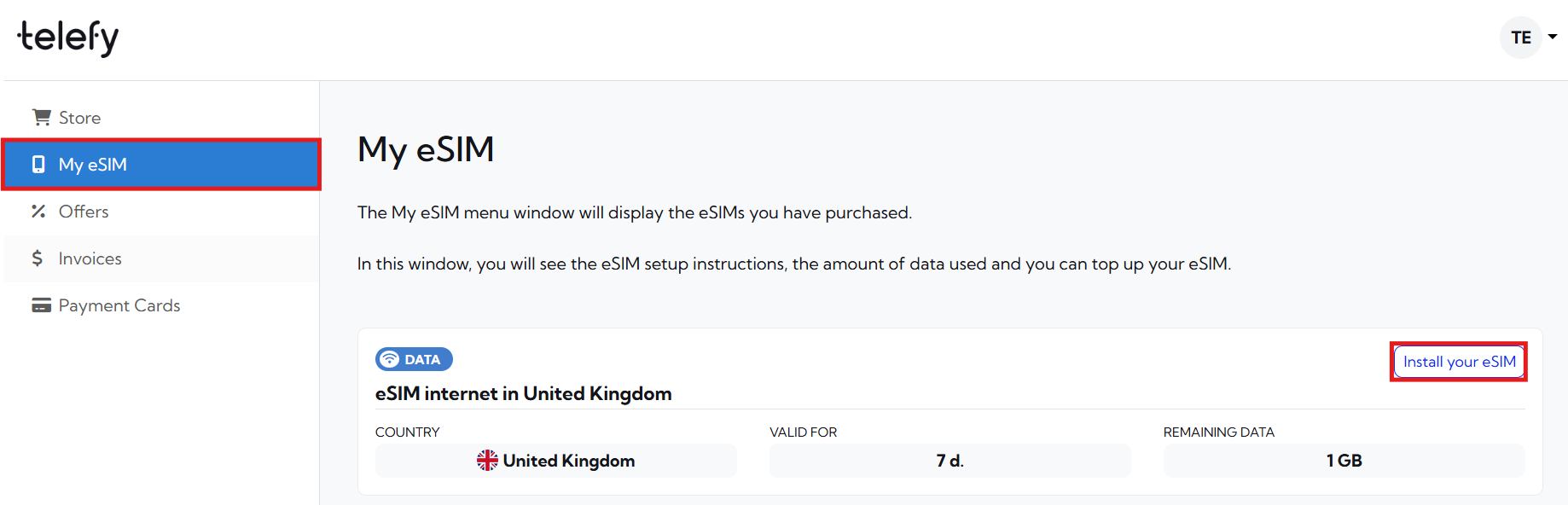
You will be presented with a QR code that you need to scan in order to initiate the installation process. You can scan it with your phone camera or follow the steps below to install the eSIM:
When installing the eSIM on this iOS device:
1. Log in to your Telefy account: Log in to your account and tap on "Install your eSIM" in "My eSIM" tab.
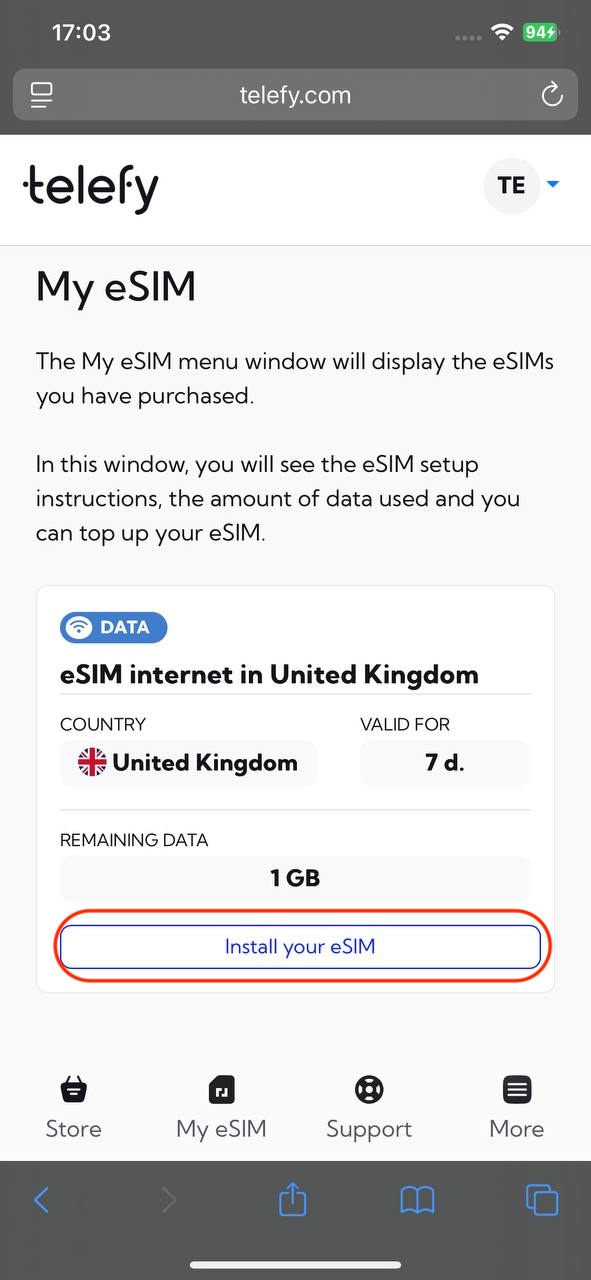
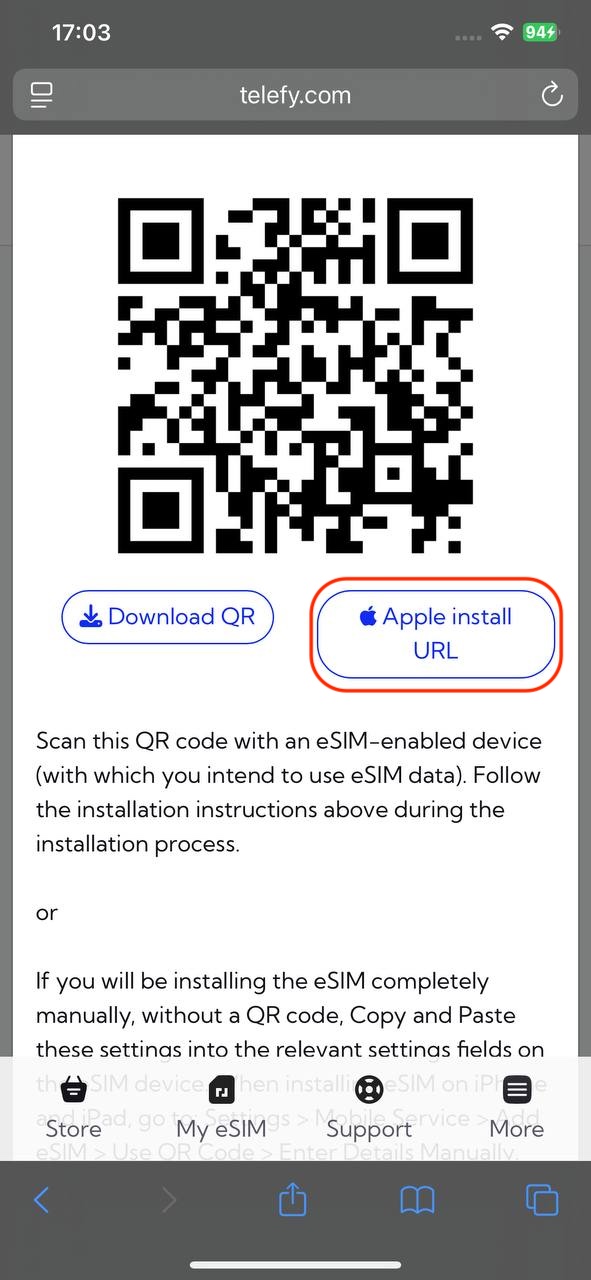
2. Tap on "Apple install URL" button: In the pop-up window locate the "Apple install URL" button and tap it to start the installation process.
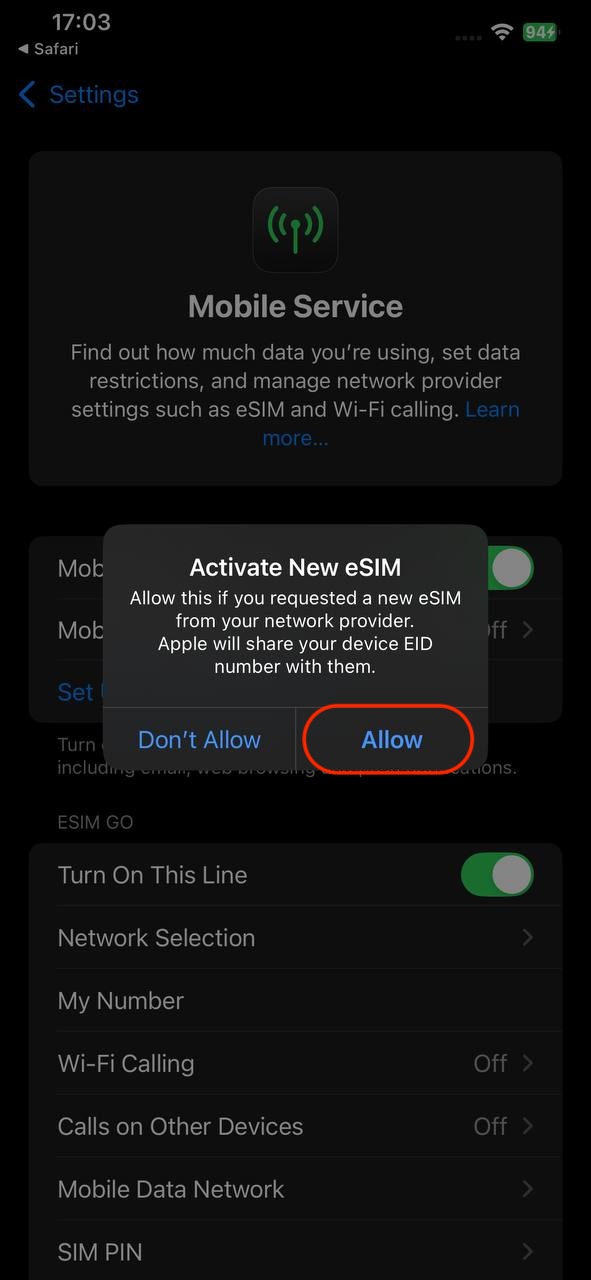
3. Follow Prompts: Follow any on-screen instructions to complete the setup.
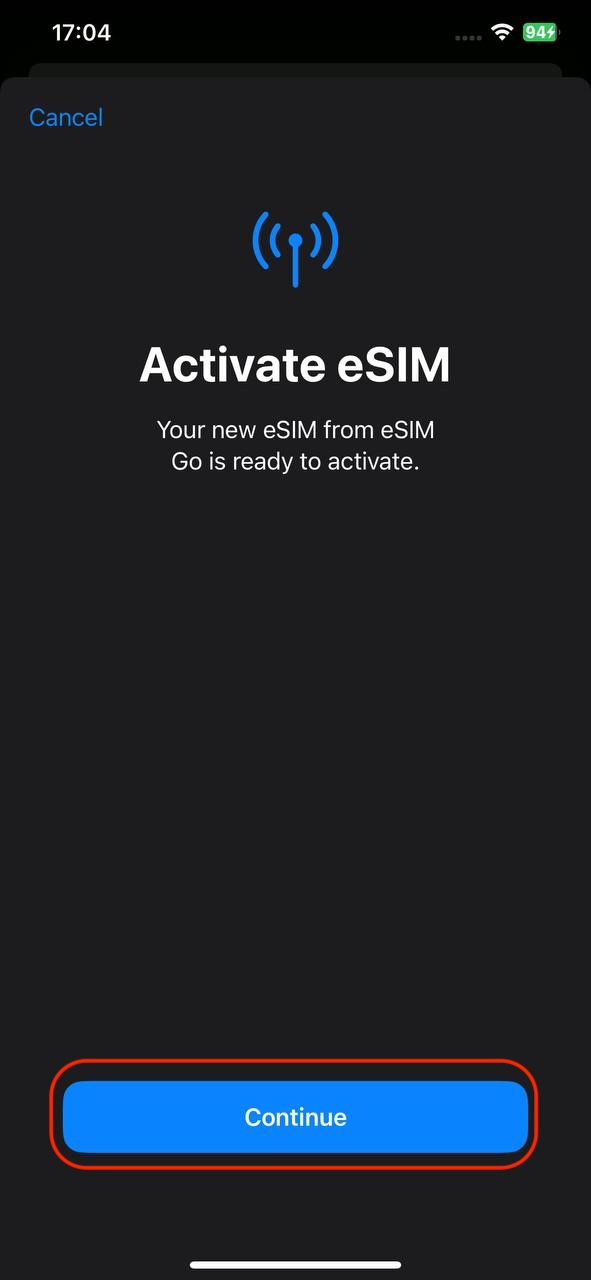
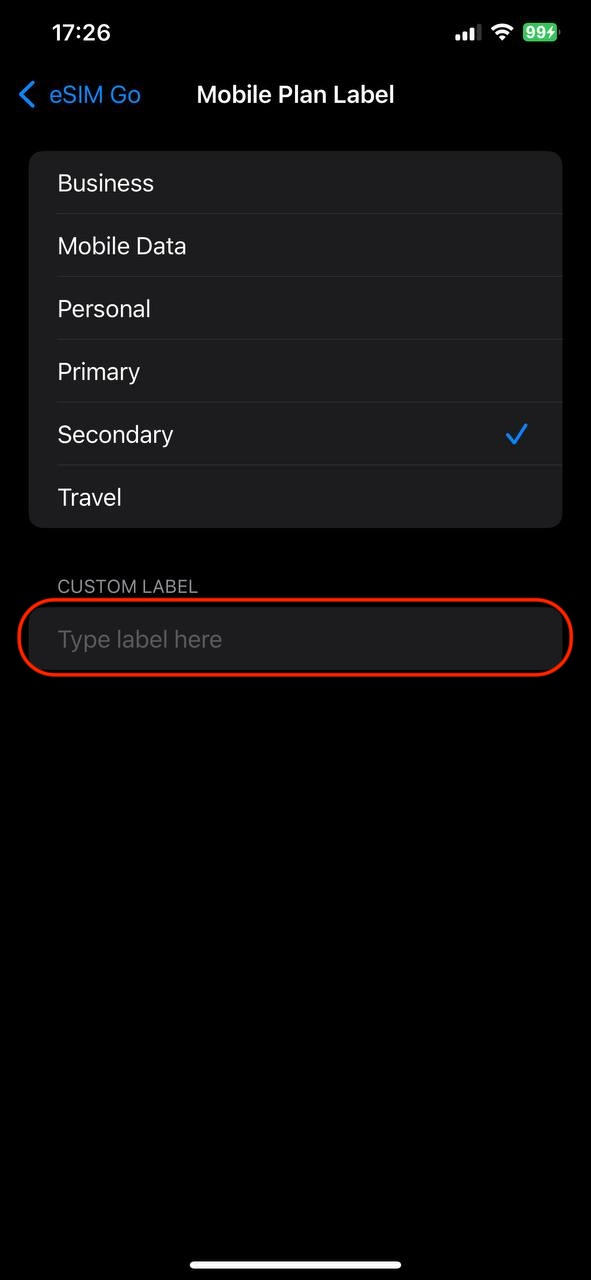
4. Label Your Plan: You can label your plan for easy identification.
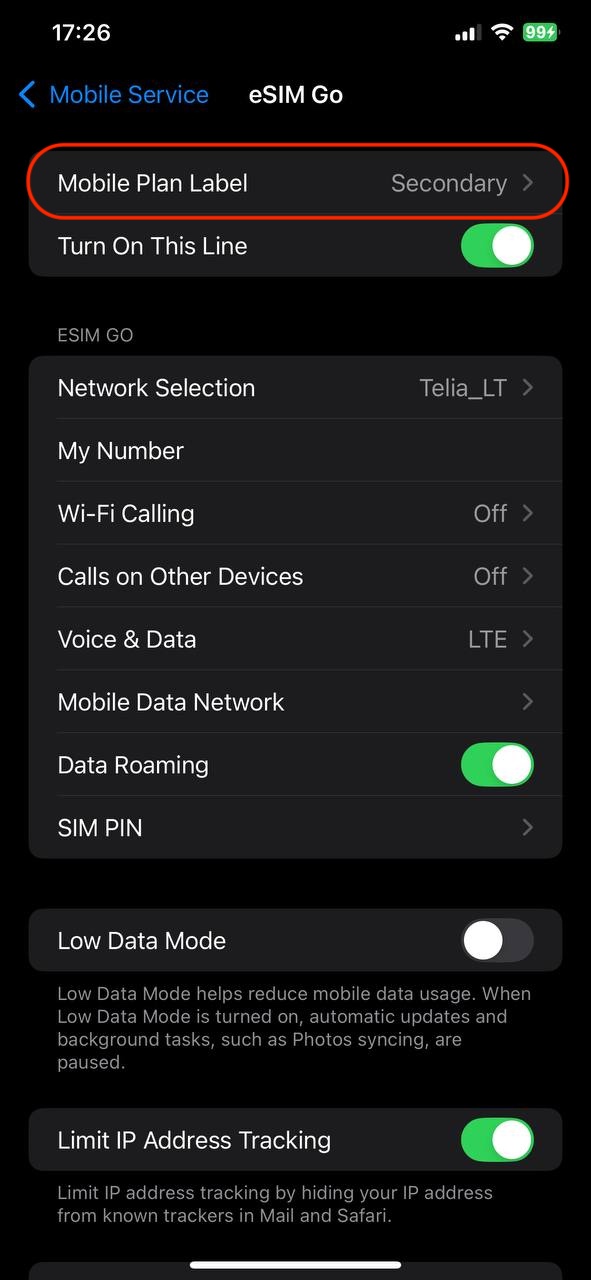
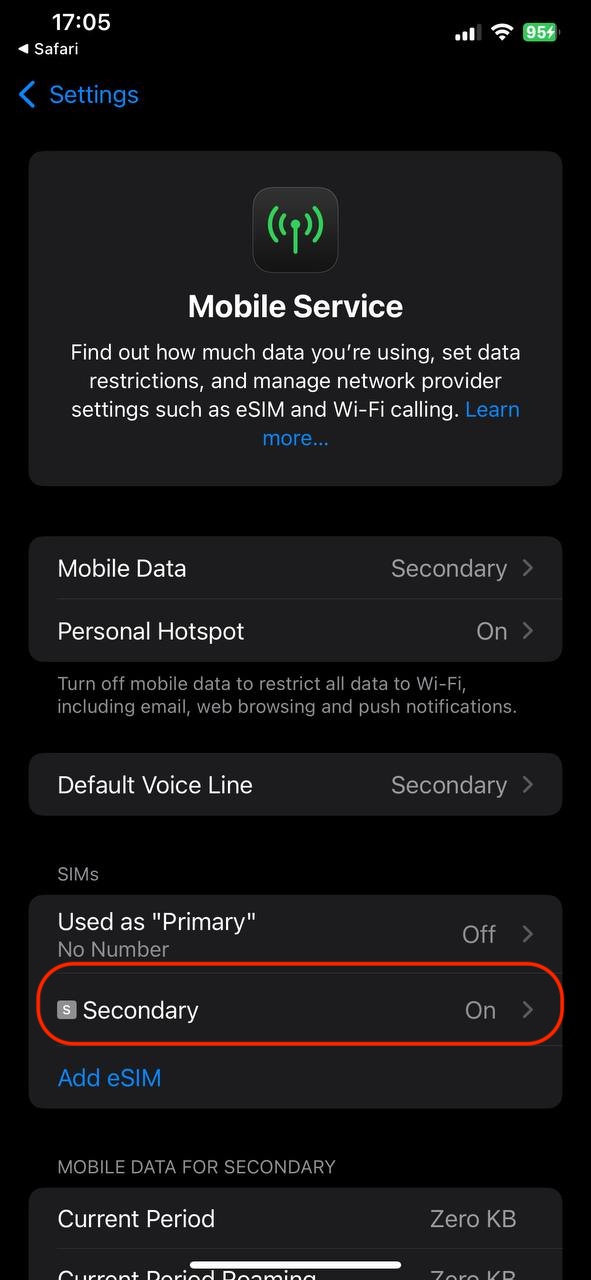
5. Turn On Data: Ensure that the line and roaming is enabled for data use.
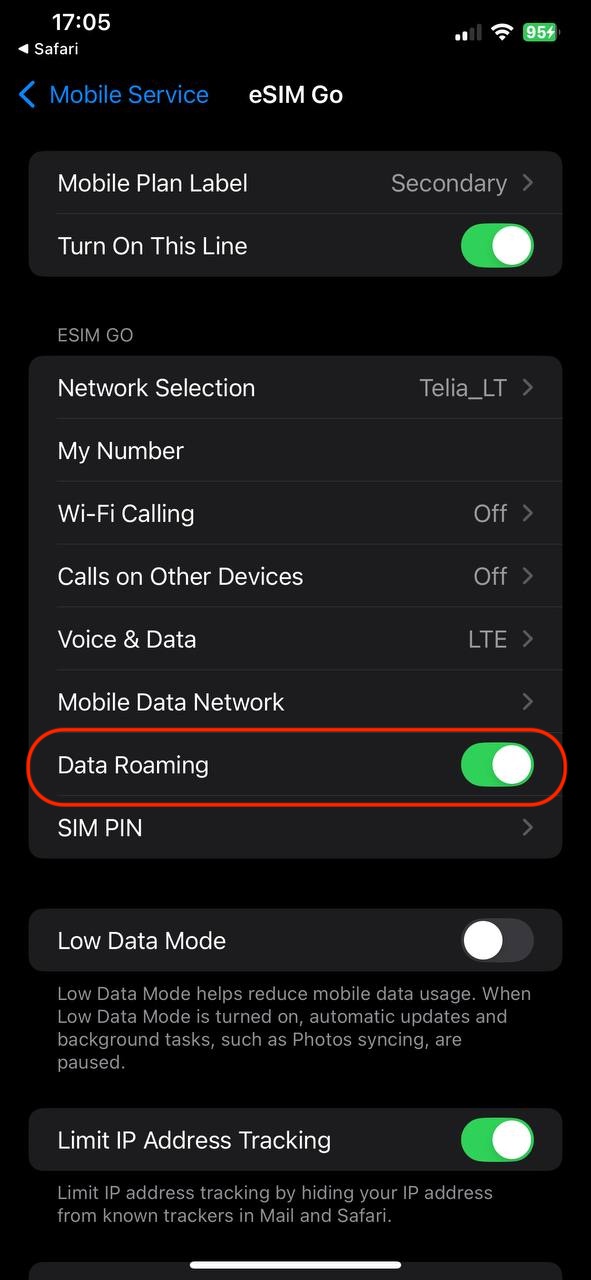
When installing the eSIM on another iOS device:
1. Open Settings: Tap on the Settings app.
2. Select Cellular: Tap on "Cellular" or "Mobile Data."
3. Add Cellular Plan: Tap on "Add Cellular Plan."
4. Scan QR Code: Use your camera to scan the eSIM QR code you received.
5. Follow Prompts: Follow any on-screen instructions to complete the setup.
6. Label Your Plan: You can label your plan for easy identification.
7. Turn On Data: Ensure that the line and roaming is enabled for data use.
If you encounter any difficulties during the installation process, do not hesitate to contact us via email [email protected].
How to install eSIM on Android smartphone or tablet?
After a successful purchase you will be able to find your eSIM plans on your account. Installing the eSIM is easy and won't take longer than 5 minutes!
In the "My eSIM" tab locate the eSIM plan you wish to install and click "Install eSIM".
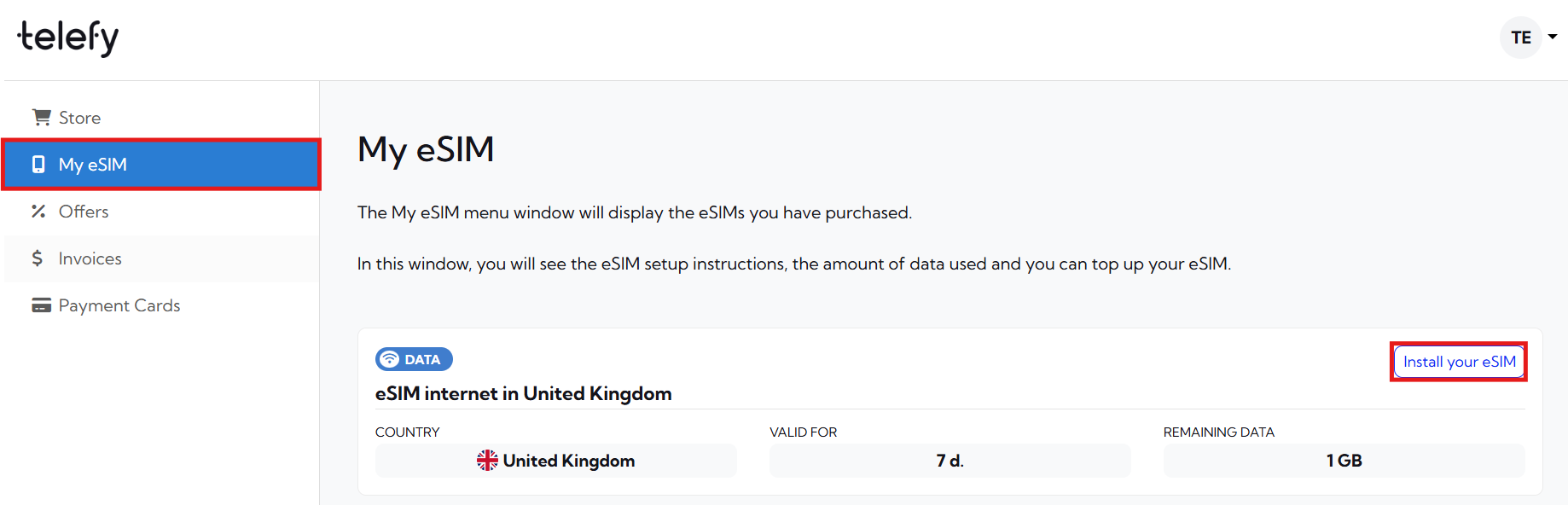
You will be presented with a QR code that you need to scan in order to initiate the installation process. You can scan it with your phone camera or follow the steps below to install the eSIM:
When installing the eSIM on this Android device:
1. Log in to your Telefy account: Log in to your account and tap on "Install your eSIM" in "My eSIM" tab.
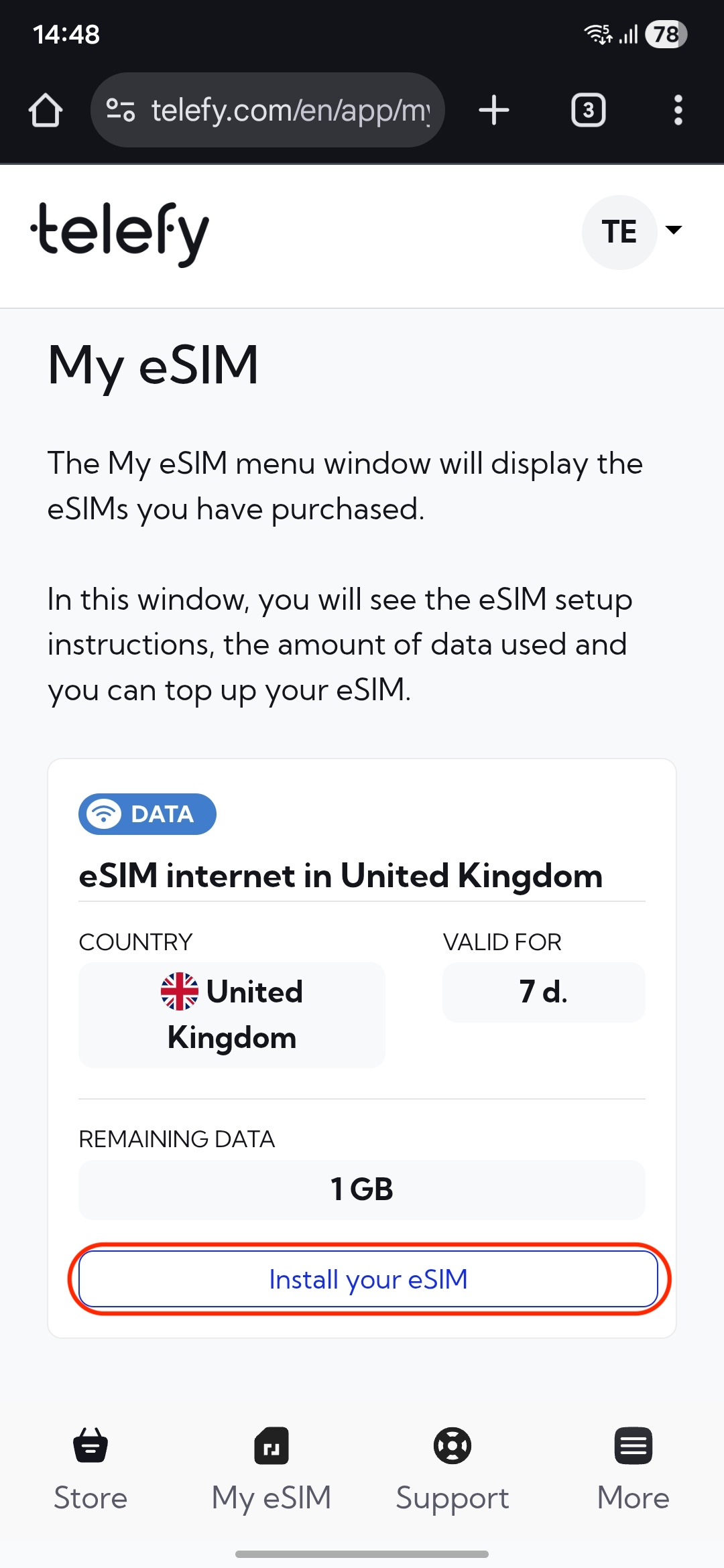
2. Download the QR code to your device: In the pop-up window locate the "Download QR" button and tap it to Download the code.
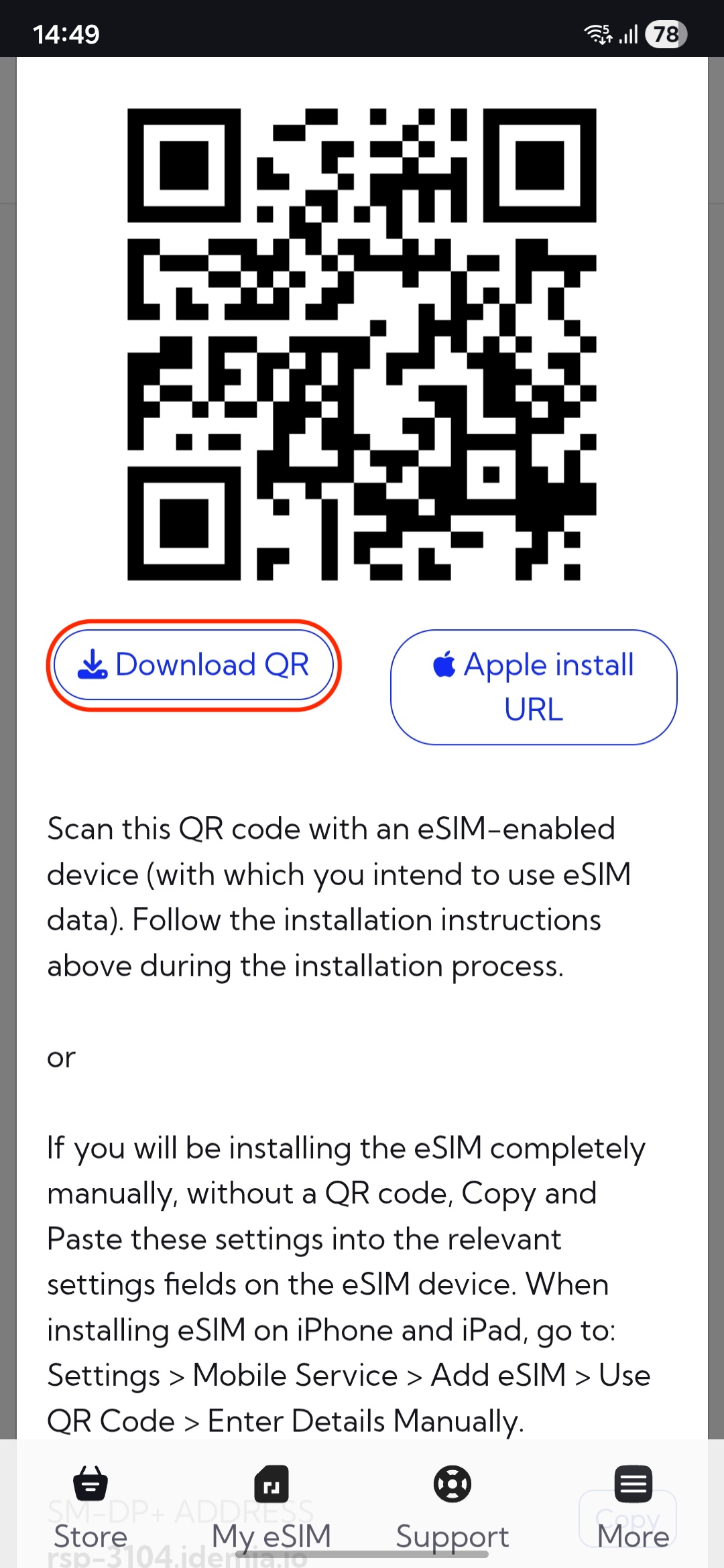
3. Open Settings: Go to the Settings app.
4. Select Connections: Tap on "Connections"
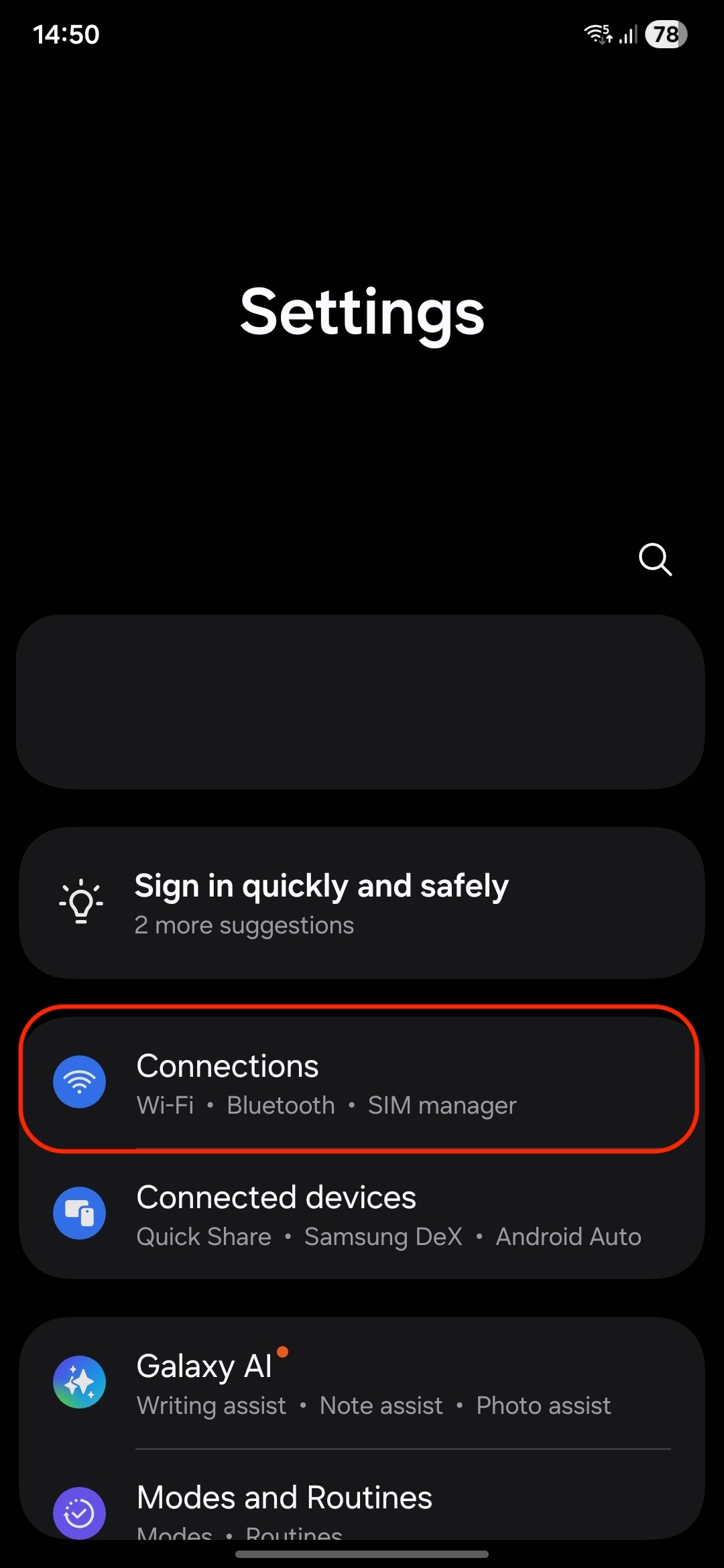
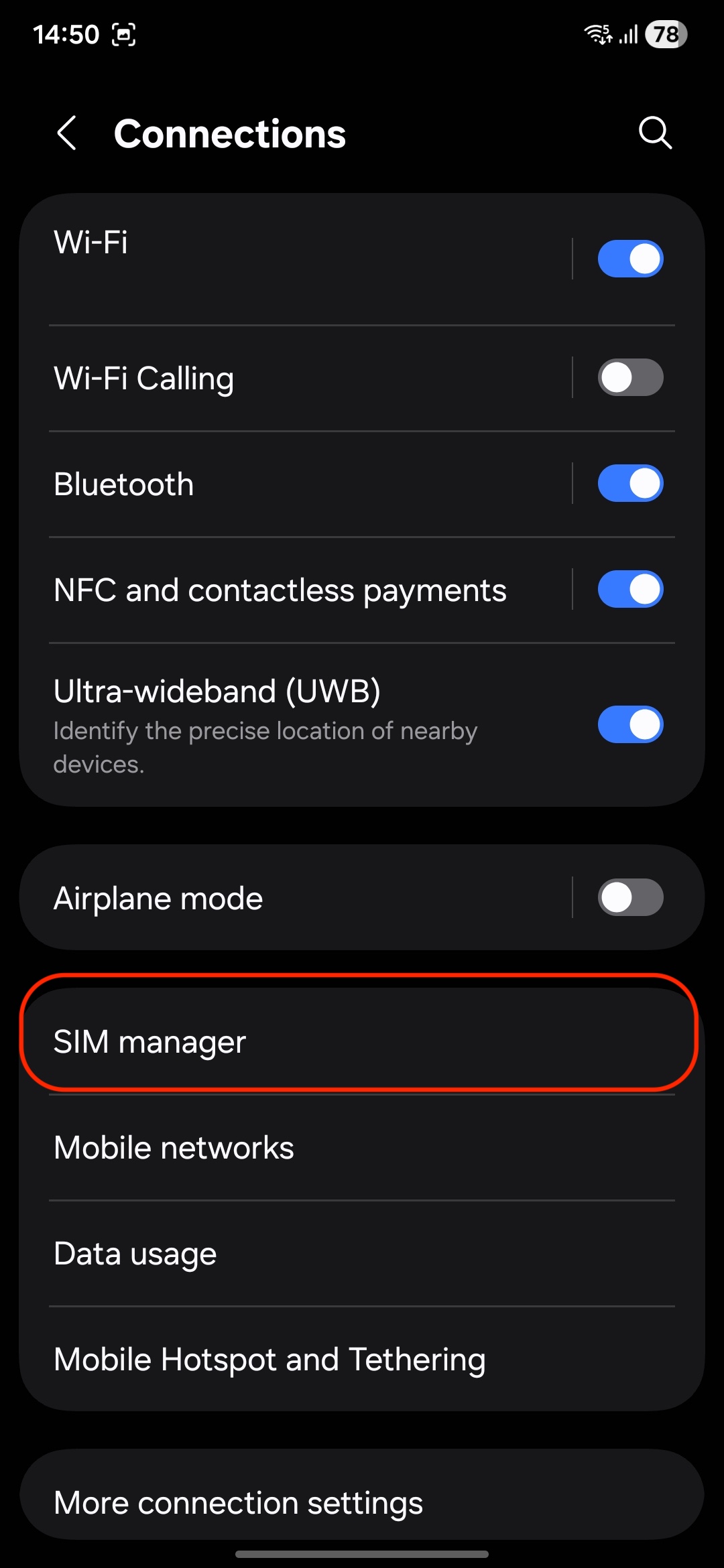
5. SIM Manager: Tap on "SIM manager."
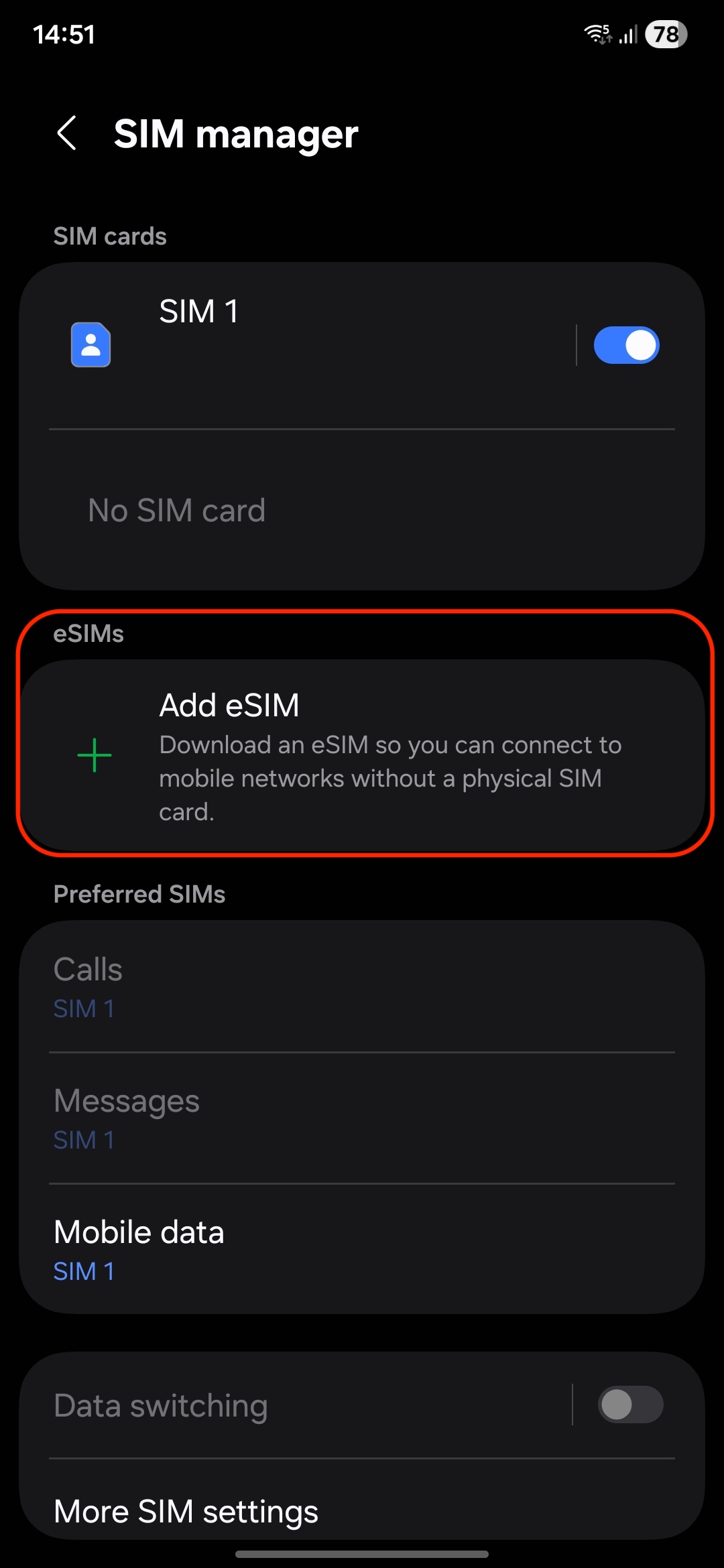
6. Add eSIM: Select "Add eSIM".
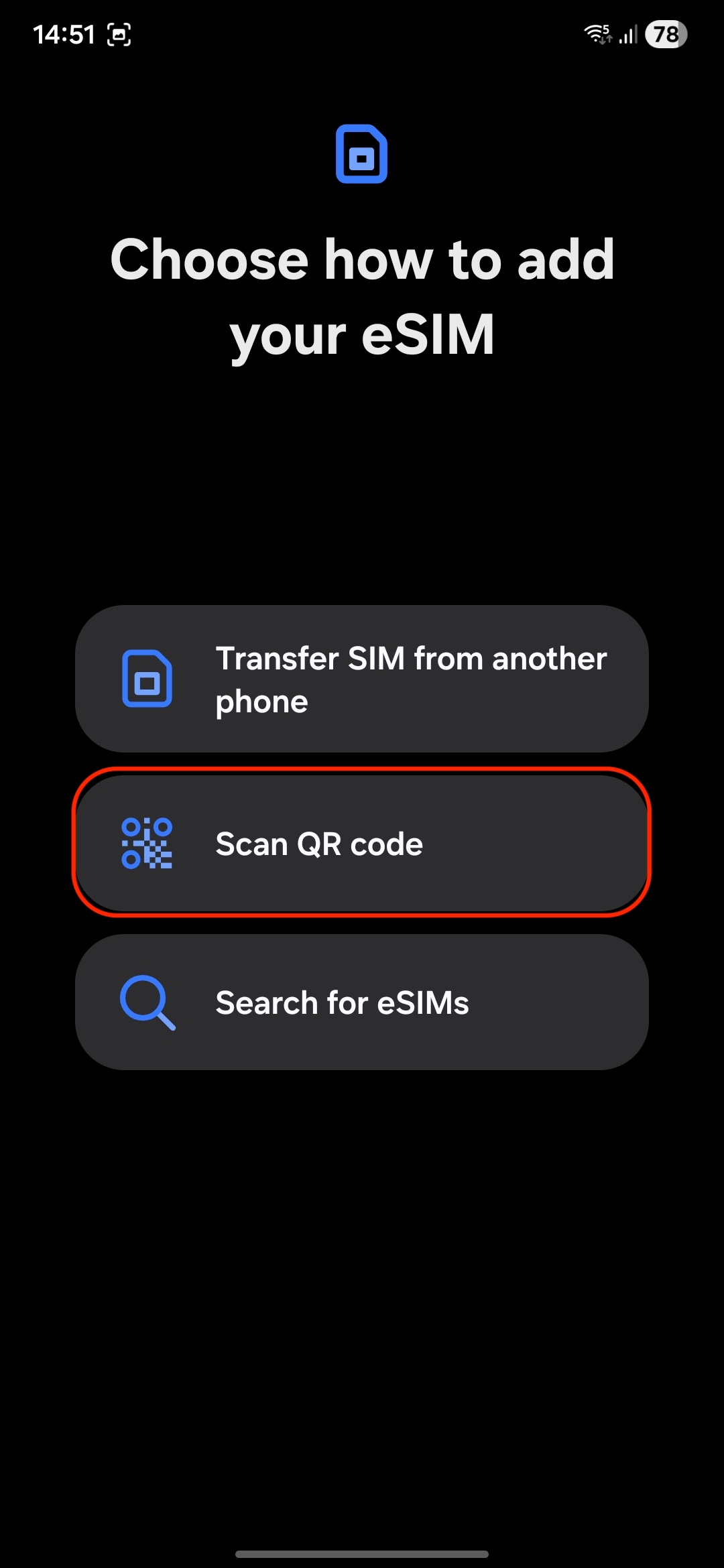
7. Scan QR Code: Use the camera to scan the eSIM QR code provided on the website or select the photo from the gallery.
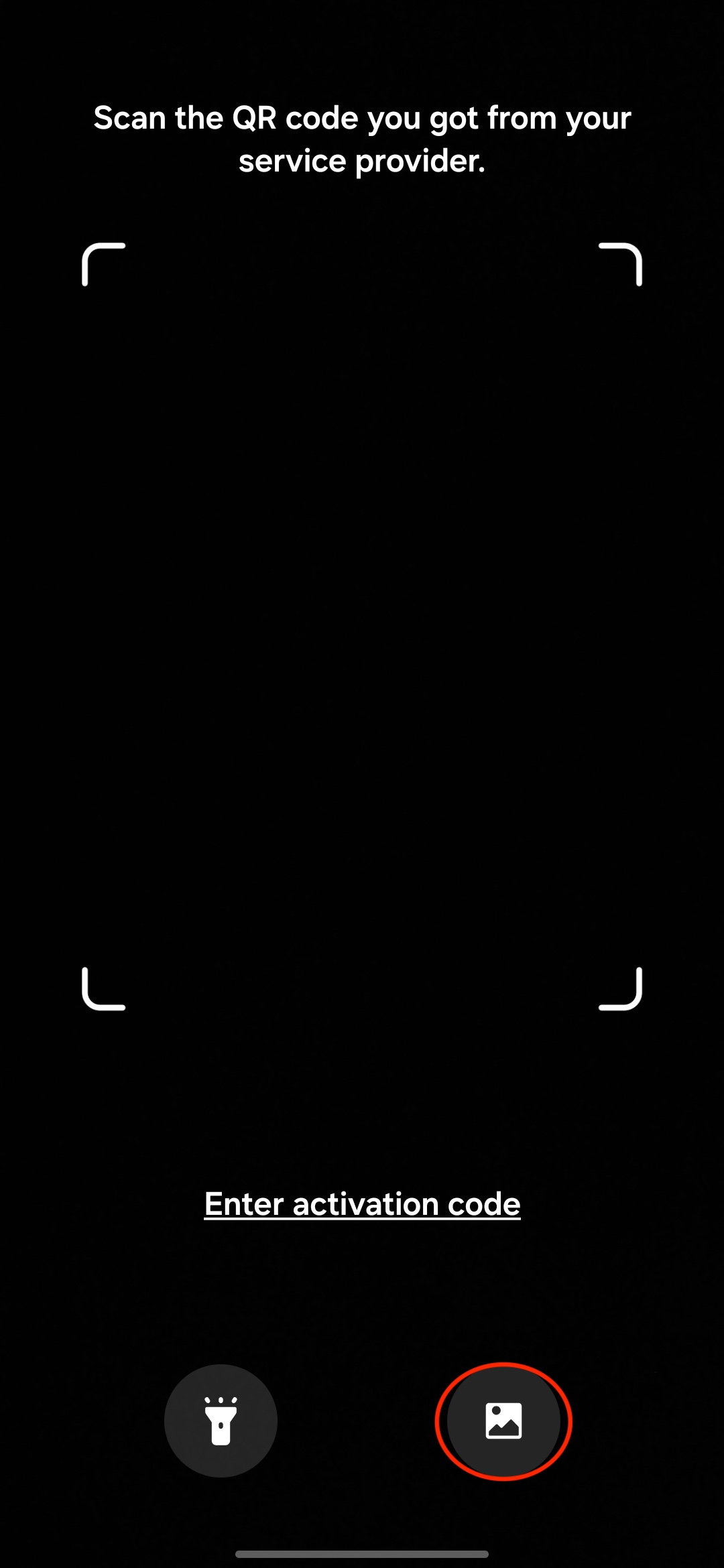
8. Follow Prompts: Complete the setup by following any on-screen instructions. You can rename the eSIM profile by taping on the edit button.
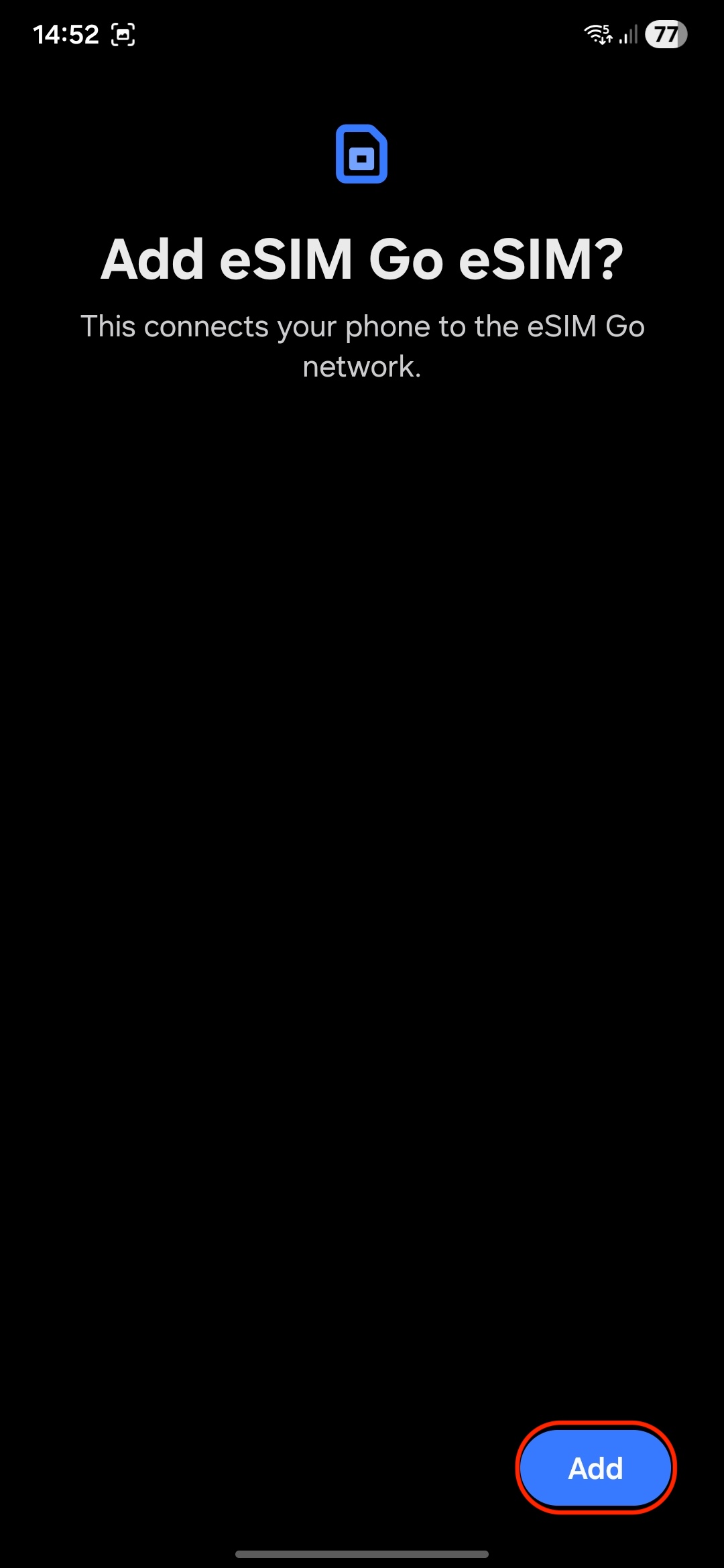
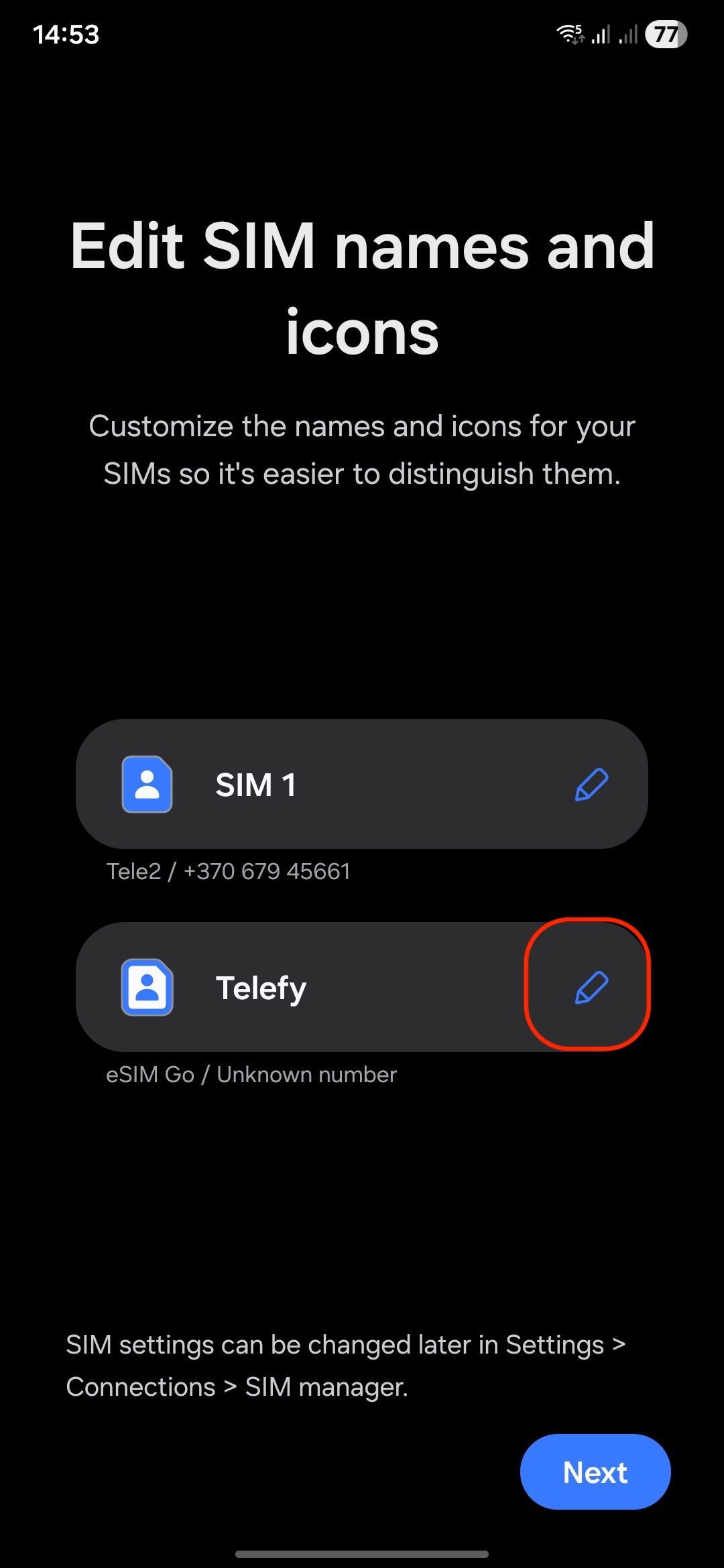
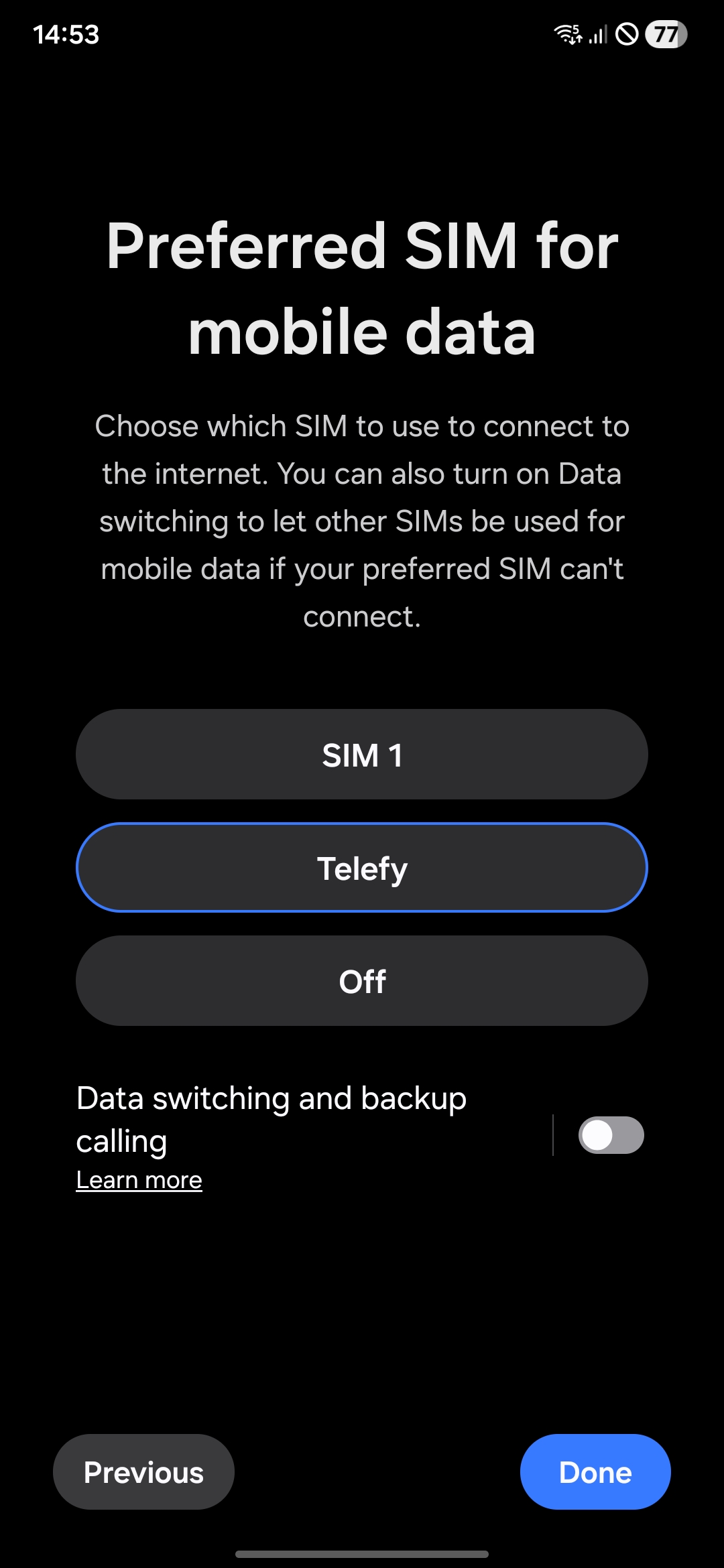
9. Enable Mobile Data: Ensure that mobile data and roaming is turned on for the eSIM.
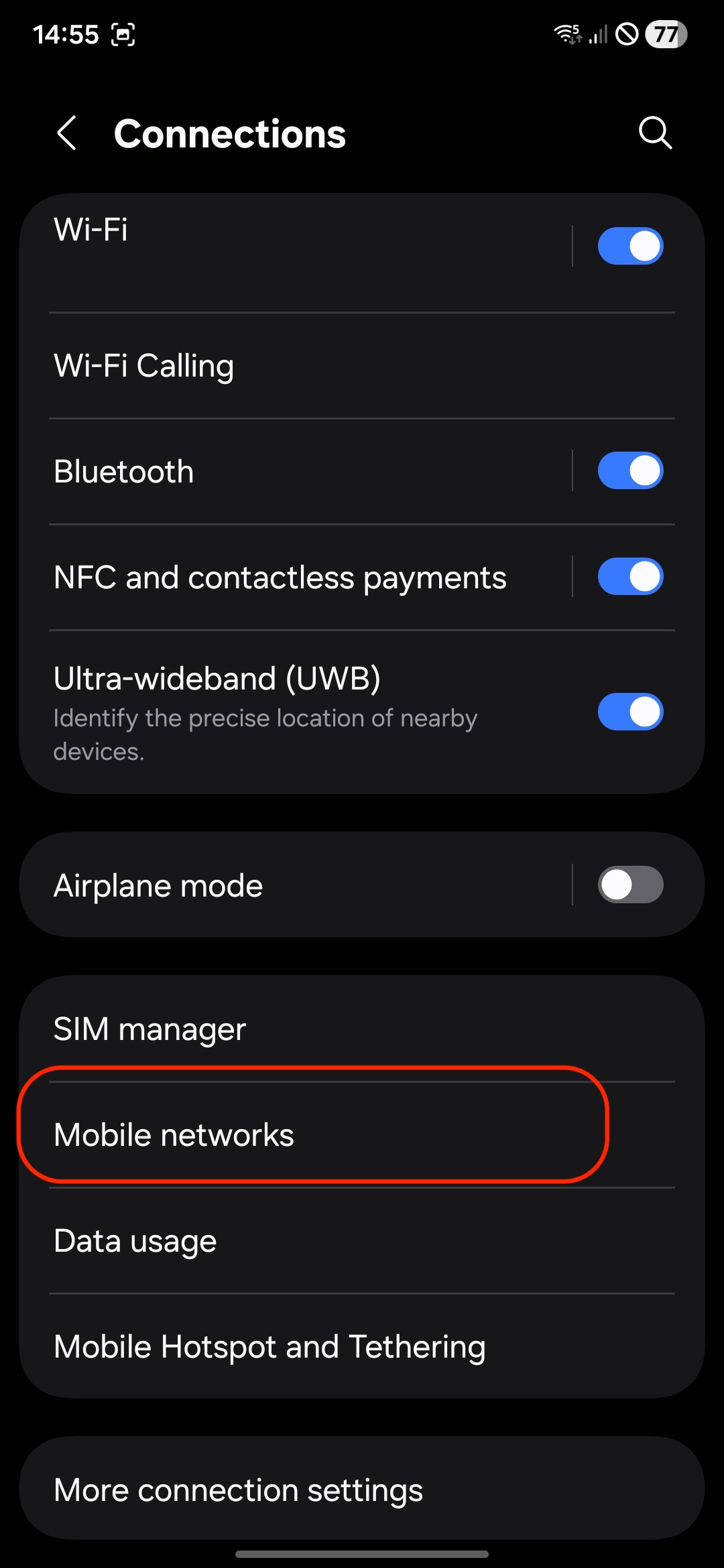
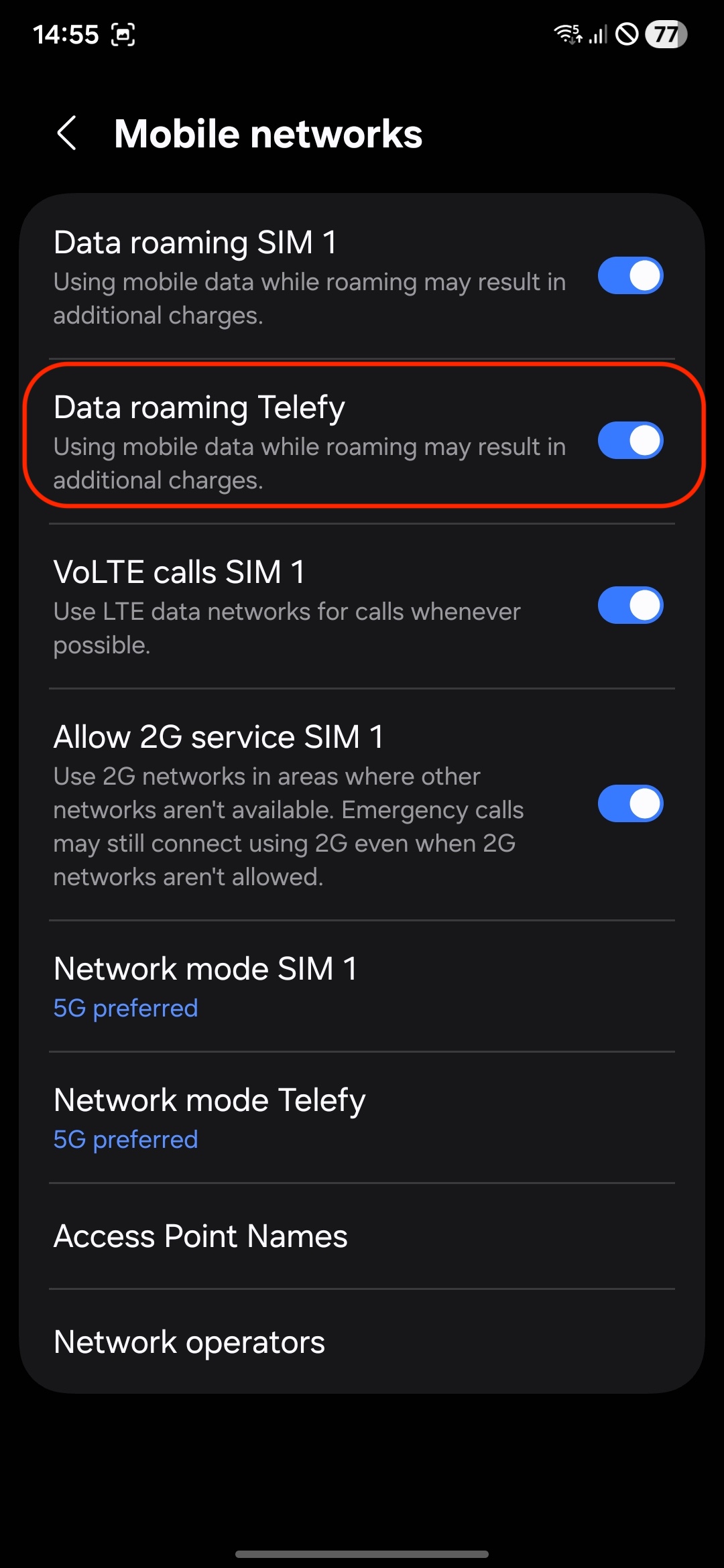
When installing the eSIM on another Android device:
1. Open Settings: Go to the Settings app.
2. Select Connections: Tap on "Connections"
3. SIM Manager: Tap on "SIM manager."
4. Add eSIM: Select "Add eSIM".
5. Scan QR Code: Use the camera to scan the eSIM QR code provided on the website.
6. Follow Prompts: Complete the setup by following any on-screen instructions.
7. Enable Mobile Data: Ensure that mobile data and roaming is turned on for the eSIM.
If you encounter any difficulties during the installation process, do not hesitate to contact us via email [email protected].
The eSIM does not connect to the internet
Make sure you are located within the eSIM's designated coverage area.
Remember, the eSIM will only connect to the network when you are in the country where the eSIM is registered. If you installed the eSIM prior to traveling, it will only activate once you arrive at your destination. Ensure you are at the location associated with the eSIM for it to function properly.
What steps should I take if my eSIM is installed correctly but won’t connect?
If you are in the coverage area and the eSIM is properly installed, please follow these steps:
1. Disable Airplane Mode: Ensure that Airplane Mode is turned off on your device.
2. Enable Data Roaming: Go to your phone settings and enable data roaming for the eSIM.
3. Restart Your Phone: Restart your device and wait for up to 30 minutes, as it may take some time for the eSIM to connect to the internet.
4. Select Network Manually: Try manually selecting the network that the eSIM should connect to for internet access. This can often help establish a connection.
What if I still can’t connect to the internet after following these steps?
If you’ve completed these steps and still can’t connect, please contact customer support for further assistance at [email protected]
Need help? We've got your back
Our team is just a message away, ready to guide you through every step of your eSIM journey.
Let's talk

FAQ
Is eSIM available in Ireland?
Yes. The local eSIM Ireland plans work through Vodafone Ireland and Three Ireland on 5G or 4G. All your phone needs is to be eSIM capable and not carrier-locked. O2 European eSIM and Vodafone Global eSIM include Ireland as one of their countries.
Does an Irish eSIM come with a local phone number?
Not with these. The 1 GB and 5 GB local plans are data only, and O2 European eSIM and Vodafone Global eSIM give you a UK mobile number. Anyone with an Irish number can be reached over WhatsApp on any of the four.
Will my eSIM Ireland plan work in Belfast as well as Dublin?
Yes, if you go with either O2 European eSIM or Vodafone Global eSIM, because both include the United Kingdom. The local plans end at the border, so if you plan a day trip from Dublin, you'll need one of those two.
Can passengers share my data on the road?
Yes, easily. All four plans support hotspot use, and it's unlimited on all four. That's handy on a long Kerry day in the car with two phones and a tablet.
When should I buy an eSIM for Ireland?
The local plans can be purchased well in advance, as you have 1 year to activate them. O2 European eSIM and Vodafone Global eSIM only last 30 days from purchase, so don't buy those until a day or two before you fly.


