How an eSIM France plan changes from region to region
What about an eSIM France plan? We'd start not with gigabytes but with your route. There are two different kinds. The local plans use the Orange, SFR and Free Mobile networks and are data only: 1 GB at 3.99 EUR for 7 days or 5 GB for 30 days at 10.99 EUR. Then there's the O2 European eSIM and the Vodafone Global eSIM. They come with a UK mobile number, calls and inbound texts and they don't drop dead at the border. That's behind much of the advice on this page.
Mobile coverage is patchy though. Even Arcep, the French telecoms regulator, has found call quality is substantially worse in rural zones, for all four operators. Those are averages (Arcep states so itself), which is why the same France eSIM can seem fast on a Paris platform but thin on an Alpine summit.
eSIM Paris and the metro
Dead zones aren't something to worry about in Paris. RATP activated 4G on the whole 16 line metro network and RER A & B lines in June 2020, and the 4 French providers share the same gear through 304 underground stations and the tunnels in between. That's reinforced by Arcep's 2025 stats: around 93% of web pages are loaded in under five seconds on the metro, around 84% on RER and Transilien trains. We wouldn't think twice about replying to a message while between Châtelet and Gare de Lyon.
Your tickets are more important. Purchase a Metro-Train-RER ticket in the Île-de-France Mobilités app and the ticket appears immediately on your phone, and iPhones can keep Navigo in the Apple Wallet. Android phones are a little more complicated (NFC required), so check first.
Getting to Orly? Say you bought the eSIM but haven't installed it yet. Free WIFI-AIRPORT in Orly or Charles de Gaulle will work for that, and Line 14 has been running to Orly since 24 June 2024, approximately 20 minutes from Gare de Lyon. Coming up from London on the Eurostar to Gare du Nord, a roughly 2h20 trip? The UK has the O2 and Vodafone coverage, so you're on the same eSIM at both ends.
Chamonix and the Alps, one hike in three countries
A plan for France only starts to feel a little constricted in Chamonix. Italy's just over the Mont Blanc Tunnel, 11.6 km away in Courmayeur, and the Tour du Mont Blanc takes you around 170 km of France, Italy and Switzerland. Phones flit around here too. The site Que Choisir has flagged up phones darting onto foreign masts with their owners remaining in France, and Switzerland is one of the borders the site mentions. A local Telefy plan only features French networks, so an Italian or Swiss mast isn't going to be of any use, but both O2 and Vodafone include Italy and Switzerland. Just bear in mind that O2's unlimited calls are written to the UK and the EU, and Switzerland isn't in the EU.
Expect patchy signals high up. One blogger's account of the circuit says there's coverage in just about every spot, apart from around Les Mottets, but that's one walk, not a map, so set up your route before you hit the first pass. If you get into trouble, 112 is free in France and Italy.
Provence and the Côte d'Azur
Your paperwork goes on your phone in Provence. The Calanque de Sugiton (outside Marseille) demands free booking in high summer, and the national park will email you a QR code for the wardens to scan on the day. Save it before you start walking. We couldn't find good coverage data for the Calanque, or the bottom of the Verdon Gorge (where the Sentier Blanc-Martel runs) so we'd treat both as offline. Arcep's Mon réseau mobile map can show coverage by operator if you'd like to look first.
It's borders again on the Riviera. You can catch a TER train from Nice to Ventimiglia some 30 times a day, stopping at Monaco and Menton, all in three countries (and less than an hour). Monaco's got its own operator, Monaco Telecom. Customers of French operators have been able to roam on it since 5 March 2024, but that's only for French SIMs, and Telefy's local plan lists only French networks. Monaco is one of the O2 and Vodafone listed countries. And Monaco numbers start +377, so remember to put +377 in your contacts!
The Atlantic coast down to the Basque border
On the Atlantic side, it's all trains. Bordeaux's 2h04 from Paris on the fastest TGV and Biarritz just over four hours, and Arcep has TGV far lower than other routes. Across all operators, only 64% of pages loaded in less than five seconds, and 56% to 74% of calls connected. TER and Intercités trains hit 65%. So save your hotel and train tickets at the station, not well past Poitiers.
The roads fared better at around 87%. Hire a car in Bordeaux, make your way south to the Landes, and maps should hold up. Cycling through the Île de Ré (there's a bridge of close to 3km from La Rochelle) and around La Rochelle itself is almost entirely maps and messages so the 5GB local plan works fine.
Further south, France ends. Biarritz to Hendaye is under half an hour by SNCF, and Euskotren Topo reaches Amara-Donostia in 37 minutes. Want to have lunch in San Sebastián? Yep, but that's Spanish networks. Spain's on the list for O2 and Vodafone and isn't on the local plan.
Brittany and Normandy, tides and Jersey masts
Brittany's coast path, the GR34, is over 2,000 km from Mont-Saint-Michel bay to Saint-Nazaire, and plenty of that's the rural France Arcep measures lower. In rural areas, 71% to 79% of pages loaded in under five seconds depending on the operator. So not hopeless, just a little slower.
Actually, take the bay seriously. The Mont-Saint-Michel tourist office notes that it has the highest tides in continental Europe, the range regularly exceeds 12 metres and that it's extremely dangerous to venture alone out to the water. Seek out a guide and consult the official tide tables before venturing into the water.
Here's a strange one from the Cotentin. Que Choisir reports a visitor at Sciotot beach who connected to a Jersey mast despite never leaving France. Jersey and Guernsey are both on the O2 and Vodafone lists, so an accidental island mast remains part of those plans. For a local plan, just select a French network manually in your device's settings.
Coming across with Brittany Ferries from Portsmouth to Caen? It's about six hours at sea, and an O2 or Vodafone eSIM is ready to go at the English end.
An eSIM for Italy and France on the same trip
As two countries cancel the local options, an eSIM for Italy and France is either O2 European or Vodafone Global. For example, let's say you take the direct train from Paris to Milan, about seven hours through Turin, on the Fréjus line that reopened 31 March 2025 after the August 2023 landslide. That's O2: 35 GB for 29.99 EUR, compared to Vodafone: 25 GB for 39.99 EUR. Now say you continue by plane from Milan to Istanbul. Turkey is on the list of Vodafone's 77 countries and not on O2's, as are the United States, Canada and Mexico.
Voice calls are different too. On O2 there's unlimited calls to the UK and within the EU, plus 500 international minutes from the EU/UK to the EU/UK. Vodafone provides unlimited calls within the destination country.
By the way Andorra doesn't appear in either list and Telefy says that using either eSIM outside the listed countries could have it blocked, so you might not want a trip through Andorra. Corsica is easier: the French hiking federation states there is no possibility of reception in the GR20 refuges, though a relay at Col de Verde now covers part of the route, and the ferry from Bonifacio to Santa Teresa Gallura in Sardinia takes around an hour. That's Italy as a day trip.
The best eSIM for France depends on your route
There's no best eSIM for France, it depends on the route. We'd sort it like this: 4 days in Paris, Wi-Fi at the hotel, 1 GB plan for 7 days is all you'd use, 2 weeks in Provence, never leaving France, take the 5 GB plan at 10.99 EUR for 30 days. Take the family walking from Chamonix out towards Courmayeur and we'd go O2, because hotspot's supported and unlimited and 35 GB will get you far for a bunch of phones. But buy it at the last minute, because O2 and Vodafone plans are valid 30 days from date of purchase and local plans can stay in place until activated at any time within a year.
And if you fancy giving the restaurant in Annecy a call instead of booking online, you'll need calls, which O2 and Vodafone will do as they'll have a UK number. For everything else it'll be WhatsApp and Maps, which a local plan will do just fine.


 eSIM France guide: which plan for which region
Signal in France varies by region, and so does the plan that's worth picking up. This eSIM France guide takes you from the Paris metro to Chamonix, Provence, the Atlantic and Brittany, then covers Telefy's local, O2 and Vodafone deals for trips that continue through to Italy or Spain.
Read MoreA France eSIM from Telefy activates before you set out and covers 35 GB across France and Europe for 30 days, with unlimited calls to the UK and within the EU plus 500 international minutes between the EU and UK. A lighter 1 GB, 7-day plan from 3.99 EUR suits shorter trips.
35 GB 30 d.
29.99 EUR
 O2 European eSIM
 High speed
 Hotspot
 Calls
 SMS
☑️ 35 GB in the UK and Europe.
☑️ Unlimited calls to the UK, within EU and inbound texts.
☑️ 500 international minutes from EU or UK to EU or UK.
☑️ UK mobile phone number.
➡️ 5G or 4G mobile data.
➡️ Supported networks: O2 network and roaming partners.
✅ Perfect for heavy data use, streaming, hotspot sharing with multiple smartphones, laptops, etc.
✅ Perfect for Maps, Tripadvisor, WhatsApp, YouTube, Netflix, Instagram, browsing and other apps.
✅ Unlimited calls to the UK and within EU countries.
✅ Comes with UK mobile phone number, unlimited calls, incoming texts.
✅ No mobile data speed limitations for all 35 GB.
✅ Faster and more secure than public Wi-Fi.
✅ Share eSIM data with everyone! Hotspot is supported and unlimited.
Full list of supported countries:
Austria, Azores, Belgium, Bulgaria, Canary Islands, Croatia, Cyprus, Czech Republic, Denmark, Estonia, Finland, France, French Guiana, Germany, Gibraltar, Greece, Guadeloupe, Guernsey, Hungary, Iceland, Ireland, Isle of Man, Italy, Jersey, Latvia, Liechtenstein, Lithuania, Luxembourg, Madeira, Malta, Martinique, Mayotte, Monaco, Netherlands, Norway, Poland, Portugal, Reunion, Romania, Saint Martin, San Marino, Slovakia, Slovenia, Spain, Sweden, Switzerland, Vatican City, United Kingdom.
*️Activating or using the eSIM outside of the supported countries can result in the eSIM to be blocked.
25 GB 30 d.
39.99 EUR
 Vodafone Global eSIM
High speed
Hotspot
Calls
SMS
☑️ 25 GB in 77 countries.
☑️ Unlimited calls within visiting country and inbound texts.
☑️ UK mobile phone number.
➡️ 5G or 4G mobile data.
➡️ Supported networks: Vodafone global network.
✅ Perfect for heavy data use, streaming, hotspot sharing with multiple smartphones, laptops, etc.
✅ Perfect for Maps, Tripadvisor, WhatsApp, YouTube, Netflix, Instagram, browsing and other apps.
✅ Unlimited calls to the UK and within EU countries.
✅ Comes with UK mobile phone number, unlimited calls, incoming texts.
✅ No mobile data speed limitations for all 25 GB.
✅ Faster and more secure than public Wi-Fi.
✅ Share eSIM data with everyone! Hotspot is supported and unlimited.
Full list of supported countries:
Albania, Anguilla, Antigua and Barbuda, Aruba, Austria, Australia, Azores, Barbados, Belgium, Bermuda, Bosnia and Herzegovina, British Virgin Islands, Bulgaria, Canada, Canary Islands, Cayman Islands, Croatia, Cyprus, Czech Republic, Denmark, Dominica, Estonia, Faroe Islands, Finland, France (incl.Corsica), French Guiana, Germany, Ghana, Gibraltar, Greece, Grenada, Guadeloupe, Guernsey, Hungary, Iceland, Ireland, Isle of Man, Italy (incl. Vatican City), Jamaica, Jersey, Kenya, Kosovo, Latvia, Lesotho, Liechtenstein, Lithuania, Luxembourg, Madeira, Malta, Martinique, Mayotte, Mexico, Monaco, Montserrat, Mozambique, Netherlands, New Zealand, Norway, Poland, Portugal, Romania, Reunion, Saint Martin, San Marino, Slovakia, Slovenia, South Africa, Spain (incl. Balearic Islands), St Kitts and Nevis, St Lucia, St Vincent and Grenadines, Sweden, Switzerland, Trinidad and Tobago, Turkey, Turks and Caicos Islands, United Kingdom and United States.
*️Activating or using the eSIM outside of the supported countries can result in the eSIM to be blocked.
1 GB 7 d.
3.99 EUR
High speed
Hotspot
➡️ 5G or 4G mobile data.
➡️ Supported networks: Orange, Societe Francaisedu Radiotelephone S.A., Free Mobile.
✅ Perfect for Maps, Tripadvisor, WhatsApp, YouTube, Instagram, browsing and other apps.
✅ Faster and more secure than public Wi-Fi.
✅ No mobile data speed limitations for all data.
✅ Share eSIM data with everyone! Hotspot is supported and unlimited.
5 GB 30 d.
10.99 EUR
High speed
Hotspot
➡️ 5G or 4G mobile data.
➡️ Supported networks: Orange, Societe Francaisedu Radiotelephone S.A., Free Mobile.
✅ Perfect for Maps, Tripadvisor, WhatsApp, YouTube, Instagram, browsing and other apps.
✅ Faster and more secure than public Wi-Fi.
✅ No mobile data speed limitations for all data.
✅ Share eSIM data with everyone! Hotspot is supported and unlimited.
What's included
☑️ Valid for 30 days since purchase
☑️ 35 GB in the UK and Europe.
☑️ Unlimited calls to the UK, within EU and inbound texts.
☑️ 500 international minutes from EU or UK to EU or UK.
☑️ UK mobile phone number.
➡️ 5G or 4G mobile data.
➡️ Supported networks: O2 network and roaming partners.
✅ Perfect for heavy data use, streaming, hotspot sharing with multiple smartphones, laptops, etc.
✅ Perfect for Maps, Tripadvisor, WhatsApp, YouTube, Netflix, Instagram, browsing and other apps.
✅ Unlimited calls to the UK and within EU countries.
✅ Comes with UK mobile phone number, unlimited calls, incoming texts.
✅ No mobile data speed limitations for all 35 GB.
✅ Faster and more secure than public Wi-Fi.
✅ Share eSIM data with everyone! Hotspot is supported and unlimited.
Full list of supported countries:
Austria, Azores, Belgium, Bulgaria, Canary Islands, Croatia, Cyprus, Czech Republic, Denmark, Estonia, Finland, France, French Guiana, Germany, Gibraltar, Greece, Guadeloupe, Guernsey, Hungary, Iceland, Ireland, Isle of Man, Italy, Jersey, Latvia, Liechtenstein, Lithuania, Luxembourg, Madeira, Malta, Martinique, Mayotte, Monaco, Netherlands, Norway, Poland, Portugal, Reunion, Romania, Saint Martin, San Marino, Slovakia, Slovenia, Spain, Sweden, Switzerland, Vatican City, United Kingdom.
*️Activating or using the eSIM outside of the supported countries can result in the eSIM to be blocked.
 Installation
3 Steps to activate eSIM
for the France

Purchase eSIM for your destination
Choose from our wide selection of eSIM plans for over 200 countries and regions.

Install with one-click Telefy setup
Click on the link we provide you and follow the simple setup instructions.

Enable eSIM mobile data on your device
Activate your eSIM and enjoy high-speed internet whenever you go.
Stay connected
wherever you go
 |
Enjoy crystal-clear voice and video calls without interruptions. |
 |
Instantly upload stories and reels wherever you are. |
 |
Create, edit, and share content seamlessly with stable data speed. |
 |
Navigate with confidence and zero loading time. |
Optimized performance for all your favorite apps
Our high-speed eSIM ensures smooth performance across 4G and 5G networks. No more buffering or dropped connections, just reliable connectivity that powers your apps anytime, anywhere.
 FAQs
Frequently asked questions
Before you travel, check out these quick answers about using eSIMs with Telefy.
What devices support eSIM?
The following is a list of manufacturers of smartphones, tablets and laptops with eSIM, grouped by operating system. This list is constantly updated as new device models are released each month.
iOS
| iPhone | 11 11 Pro 11 Pro Max 12 12 Mini 12 Pro 12 Pro Max 13 13 Mini 13 Pro 13 Pro Max 14 14 Plus 14 Pro 14 Pro Max 15 15 Plus 15 Pro 15 Pro Max 16 16 Pro 16 Pro Max Air 17 17 Pro 17 Pro Max XS XS Max XR SE 2 (2020) SE 3 (2022) |
| iPad | Air (4th generation) Air (3rd Generation) Pro 12.9‑inch (4th generation) Pro 12.9‑inch (3rd generation) Pro 11‑inch (2nd generation) Pro 11‑inch (1st generation) 9th generation 8th generation 7th generation Mini (5th Generation) Mini (6th Generation) |
Android
| Samsung | Galaxy A35 Galaxy A54 Galaxy A55 5G Galaxy S25 Galaxy S25+ Galaxy S25 Ultra Galaxy S25 Edge Galaxy S25 Slim Galaxy S24 Galaxy S24+ Galaxy S24 Ultra Galaxy S23 5G Galaxy S23+ 5G Galaxy S23 Ultra 5G Galaxy S23 FE Galaxy S22 Galaxy S22+ Galaxy S22 Ultra Galaxy Fold Galaxy Fold2 5G Galaxy Fold3 5G Galaxy Fold4 Galaxy Fold5 5G Galaxy Fold6 Galaxy Fold7 Galaxy S21+ Ultra 5G Galaxy S21 Galaxy S21+ 5G Galaxy S20 Galaxy S20+ Galaxy S20 Ultra Galaxy Z Flip Galaxy Z Flip 3 5g Galaxy Z Flip 4 Galaxy Z Flip 5 Galaxy Z Flip 6 Galaxy Z Flip 7 Galaxy Z Flip 7FE Galaxy Note 20+ Galaxy Note 20 Galaxy Note 20 Ultra Xcover7 |
| Nuu Mobile | X5 |
| Pixel 3 & 3 XL Pixel 3a & 3a XL Pixel 4, 4a & 4 XL Pixel 5, 5a Pixel 6, 6a, 6 Pro Pixel 7, 7 Pro Pixel 8, 8a, 8 Pro Pixel Fold Pixel 9, 9 Pro, 9 Pro XL Pixel 9 Pro Fold | |
| Sony | Xperia 10 III Lite Xperia 10 IV Xperia 10V Xperia 1 IV Xperia 5 IV Xperia 1 V Xperia Ace III Xperia 5 V |
| Xiaomi | 12T Pro 13 13 Lite 13 Pro 13T 13T Pro 14 14 Pro 14 Ultra 15 15 Ultra Blackshark 3 Redmi note 13 Pro+ |
| Sharp | Aquos Sense 4lite Aquos Sense 6s Aquos Sense 7 Aquos Sense 7plus Aquos Wish Aquos Wish 2 Aquos Wish 3 Aquos Zero 6 Aquos R7 Aquos R8 Aquos R8 Pro Aquos Sense 8 Simple Sumaho6 |
| Rakuten | Mini Big-S Big Hand Hand 5G |
| Honor | Magic 4 Pro Magic 5 Pro Magic 6 Pro Magic v2 Magic v3 90 X8 200 200 Pro |
| Gemini | PDA |
| Nokia | G60 XR21 X30 |
| OnePlus | OnePlus 11 OnePlus 12 |
| Motorola | Razr 2019 Razr 2022 Razr 5G Razr 40 Razr 40 Ultra Razr+ Edge 2022 Edge 2023 Edge+ (2023) Edge 40 Edge 40 Pro Edge 40 Neo Edge 50 Pro Edge 50 Ultra Edge 50 Fusion Moto G Power 5G (2024) Moto G 53 Moto G 54 Moto G 35 G52J 5G G52J 5G II G53J 5G G54 5G G84 G34 |
| Huawei | P40 P40 Pro Huawei 80 Pro / Pro+ / Ultra Mate 40 Pro Pura 70 Pro |
| Oppo | Find X3 Find X3 Pro Find N2 Flip Find X5 Find X5 Pro Find X8 Find X8 Pro Find N3 Find N3 Flip Reno 5A Reno 6 Pro 5G Reno 9A A55s 5G |
| HAMMER | Explorer PRO Blade 5G Blade 3 |
Windows 10
| ACER | Swift 3 Swift 7 TravelMate P2 TravelMate Spin P4 TravelMate P6 |
| ASUS | Mini Transformer T103HAF NovaGo TP370QL Vivobook Flip 14 TP401NA |
| Dell | Latitude 9510 Latitude 7410 Latitude 7310 Latitude 9410 Latitude 7210 2-in-1 Latitude 7440 Latitude 5410 Latitude 5411 Latitude 5511 |
| HP | Elitebook G5 Probook G5 Zbook G5 Spectre Folio 13 |
| LENOVO | Yoga C630 Miix 630 Yoga 520 Yoga 720 convertible laptops Flex 5G ThinkPad X1 Titanium Yoga 2 in 1 ThinkPad X1 Carbon Gen 9 ThinkPad X1 Fold ThinkPad X1 Nano ThinkPad X12 Detachable |
| SAMSUNG | Galaxy Book 2 |
| SURFACE | Go 2 Go 3 Duo Duo 2 Pro 9 Pro X Pro 5 LTE Advanced |
How to install eSIM on iPhone or iPad?
After a successful purchase you will be able to find your eSIM plans on your account. Installing the eSIM is easy and won't take longer than 5 minutes!
In the "My eSIM" tab locate the eSIM plan you wish to install and click "Install eSIM".
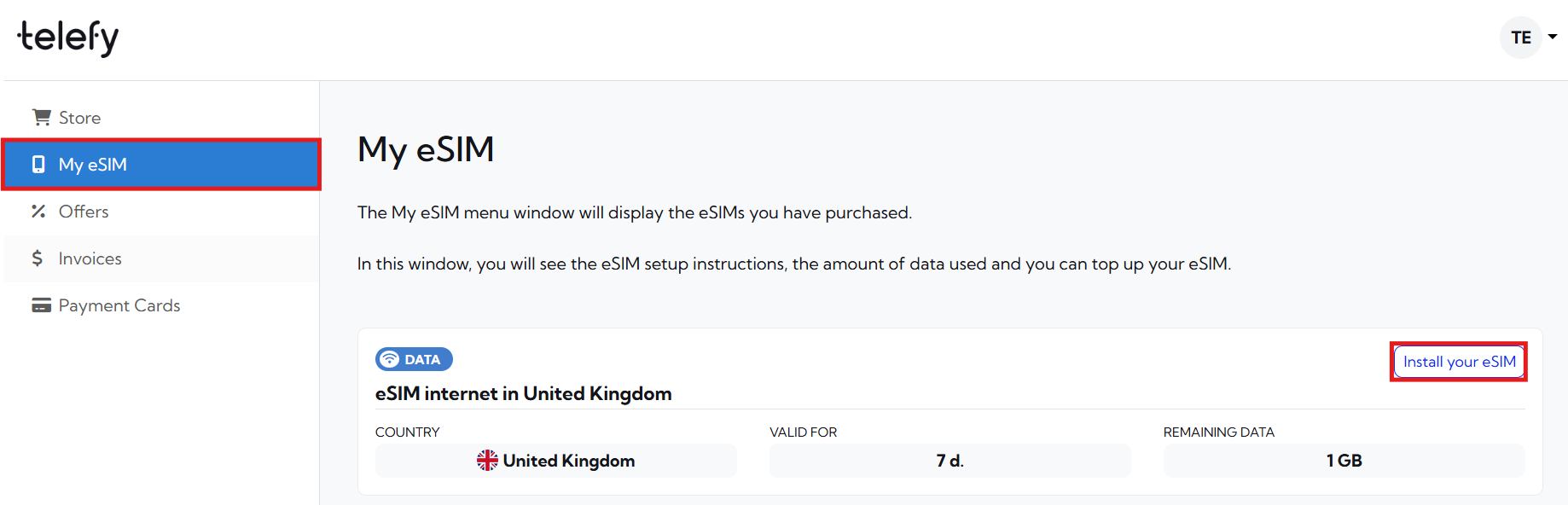
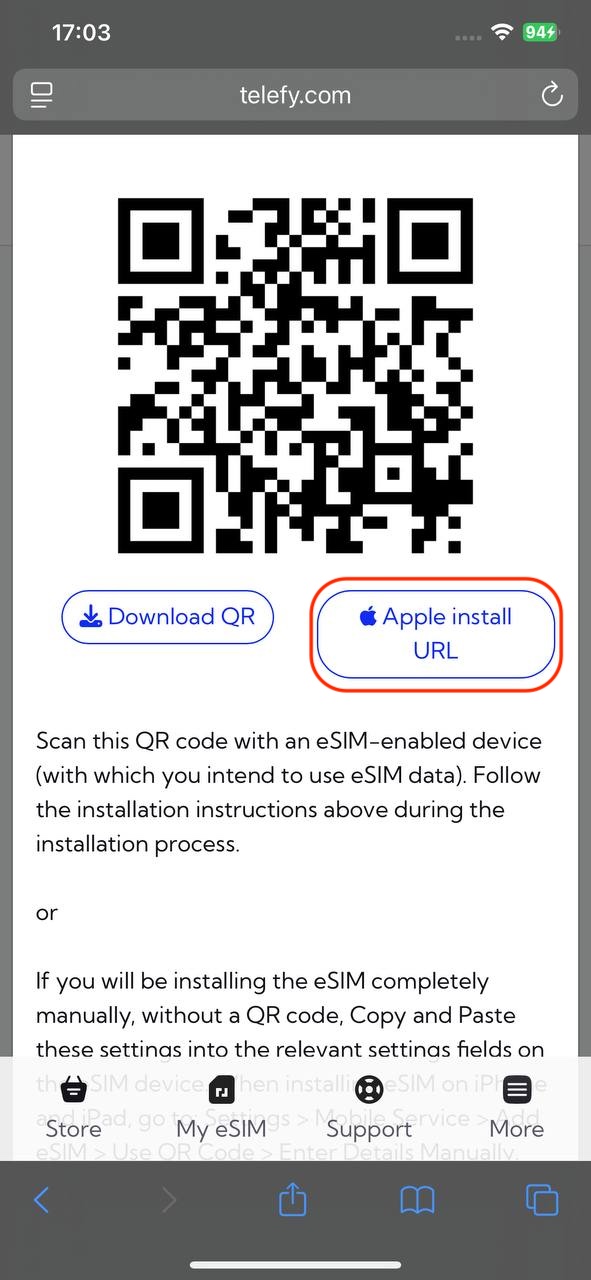
You will be presented with a QR code that you need to scan in order to initiate the installation process. You can scan it with your phone camera or follow the steps below to install the eSIM:
When installing the eSIM on this iOS device:
1. Log in to your Telefy account: Log in to your account and tap on "Install your eSIM" in "My eSIM" tab.
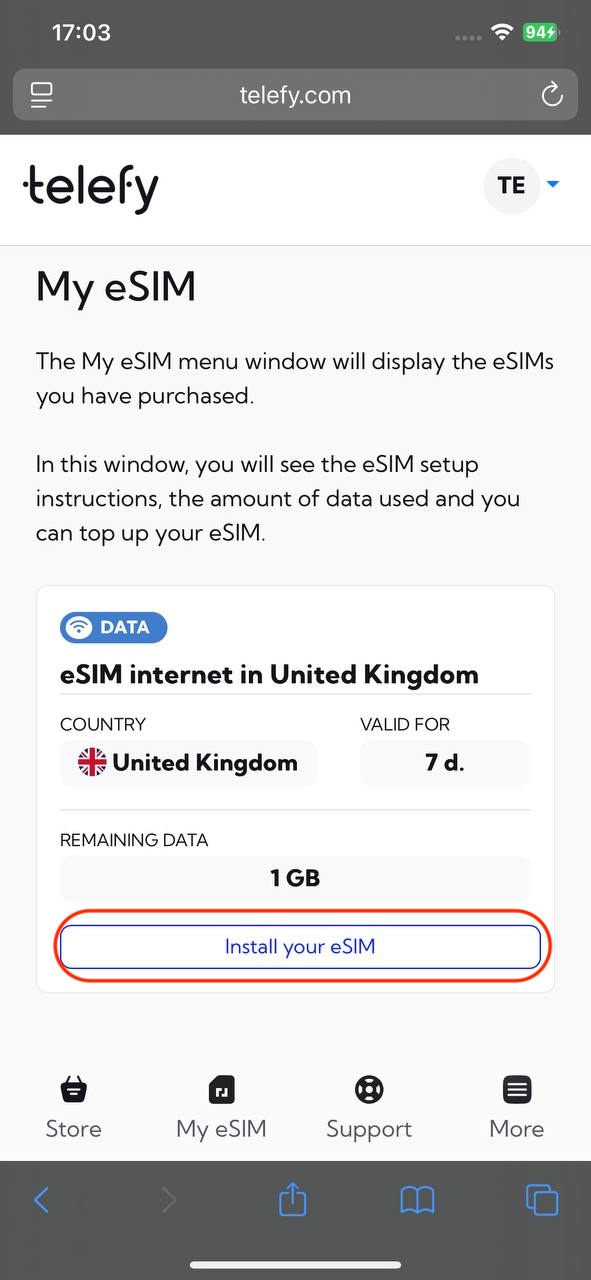
2. Tap on "Apple install URL" button: In the pop-up window locate the "Apple install URL" button and tap it to start the installation process.
3. Follow Prompts: Follow any on-screen instructions to complete the setup.
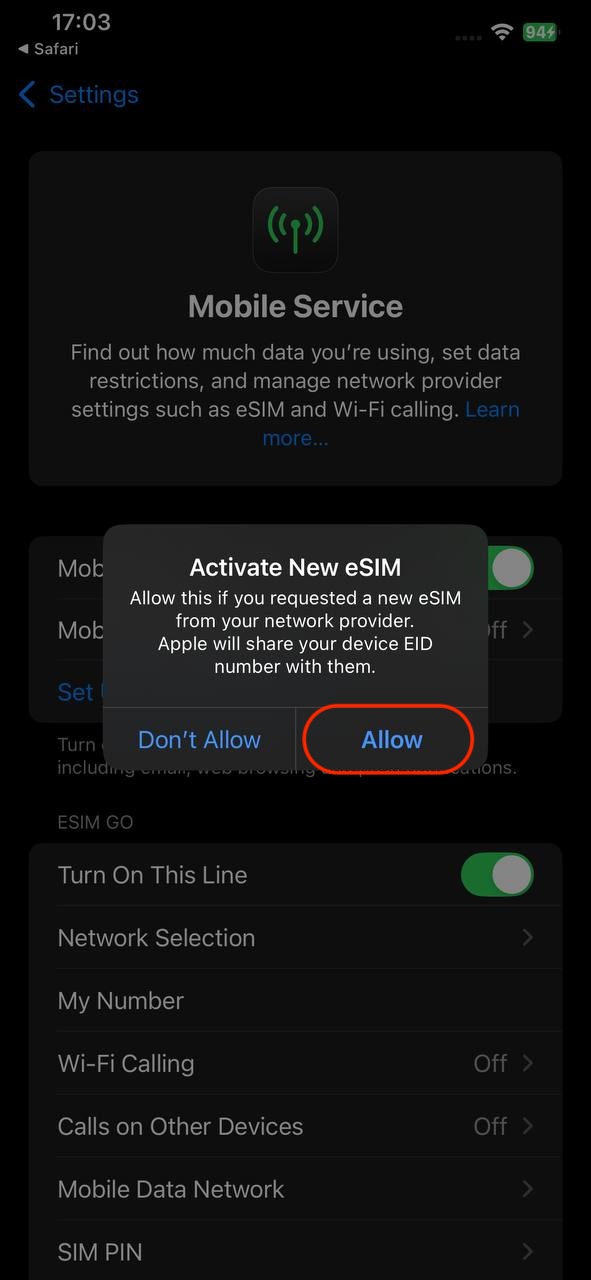
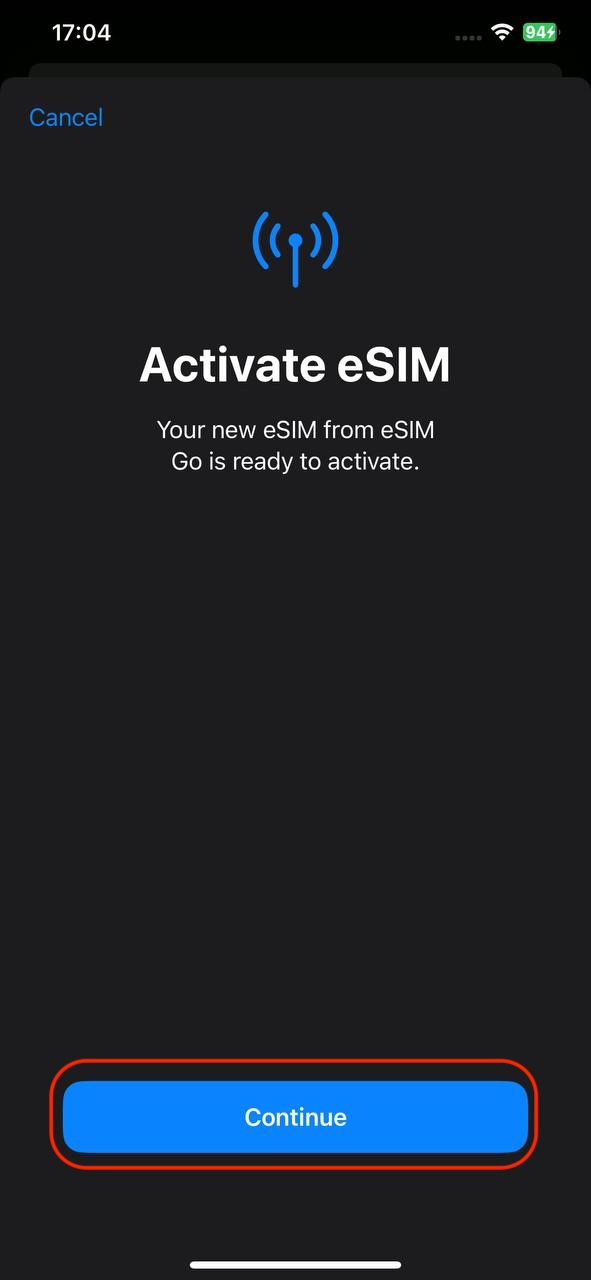
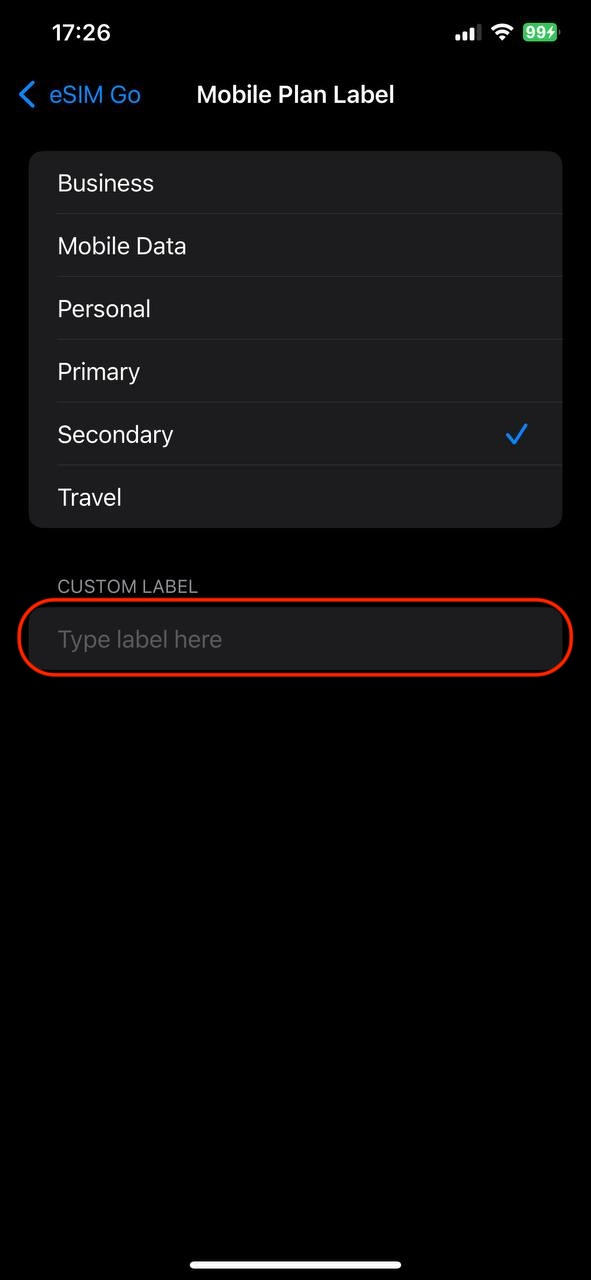
4. Label Your Plan: You can label your plan for easy identification.
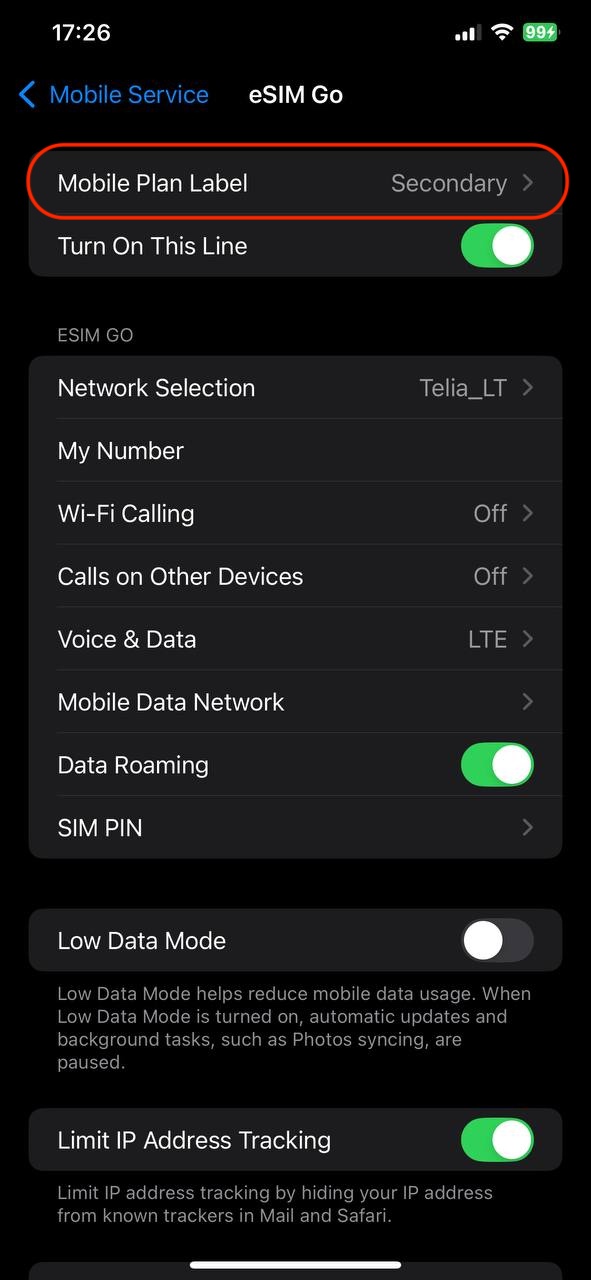
5. Turn On Data: Ensure that the line and roaming is enabled for data use.
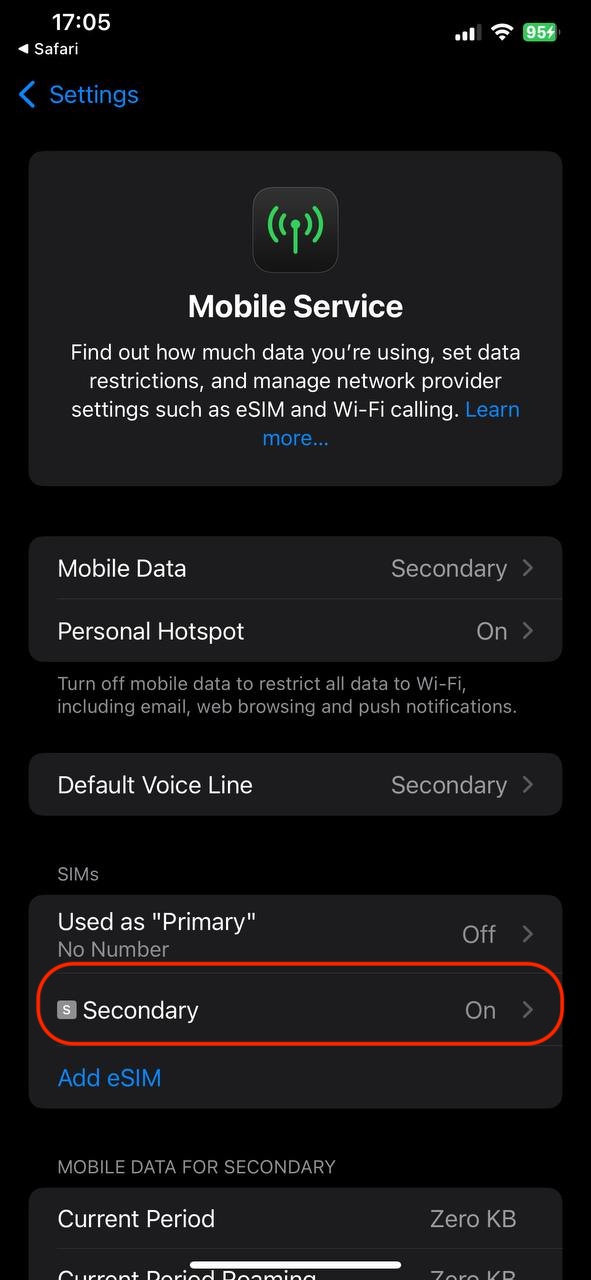
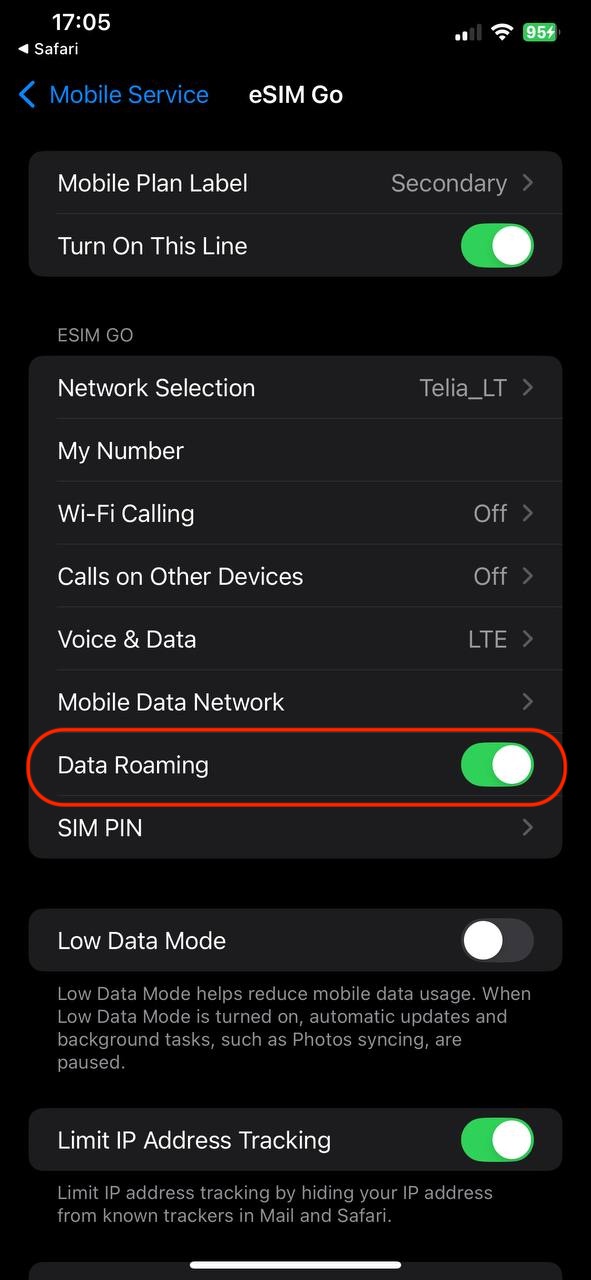
When installing the eSIM on another iOS device:
1. Open Settings: Tap on the Settings app.
2. Select Cellular: Tap on "Cellular" or "Mobile Data."
3. Add Cellular Plan: Tap on "Add Cellular Plan."
4. Scan QR Code: Use your camera to scan the eSIM QR code you received.
5. Follow Prompts: Follow any on-screen instructions to complete the setup.
6. Label Your Plan: You can label your plan for easy identification.
7. Turn On Data: Ensure that the line and roaming is enabled for data use.
If you encounter any difficulties during the installation process, do not hesitate to contact us via email [email protected].
How to install eSIM on Android smartphone or tablet?
After a successful purchase you will be able to find your eSIM plans on your account. Installing the eSIM is easy and won't take longer than 5 minutes!
In the "My eSIM" tab locate the eSIM plan you wish to install and click "Install eSIM".
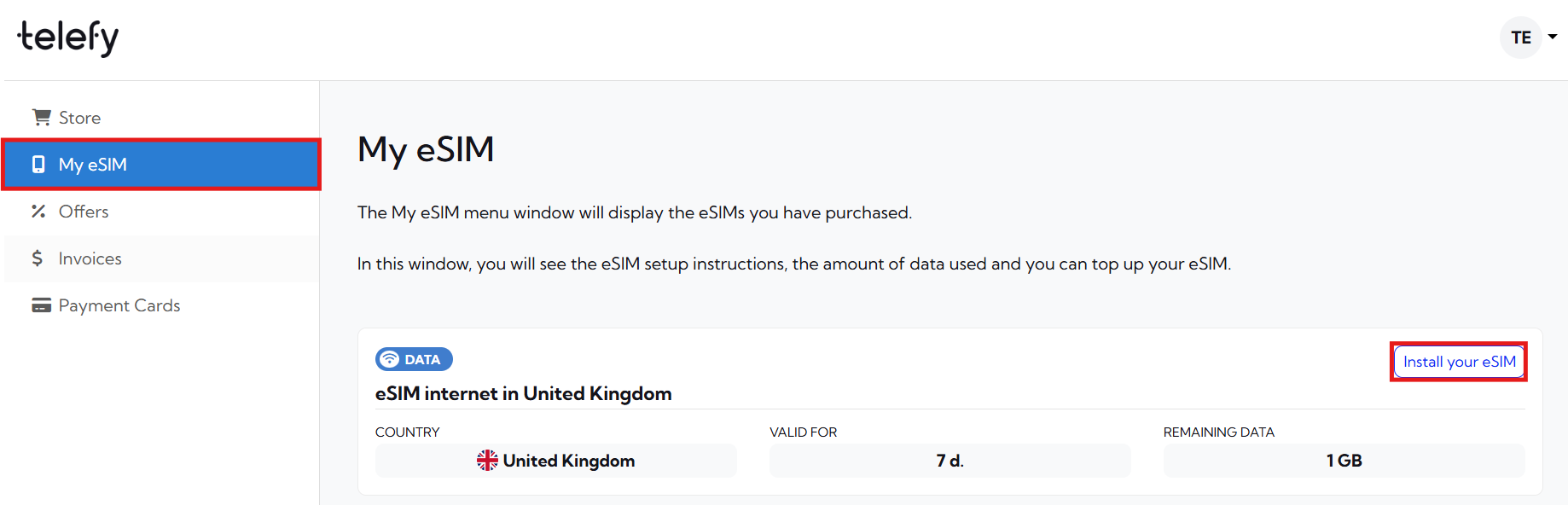
You will be presented with a QR code that you need to scan in order to initiate the installation process. You can scan it with your phone camera or follow the steps below to install the eSIM:
When installing the eSIM on this Android device:
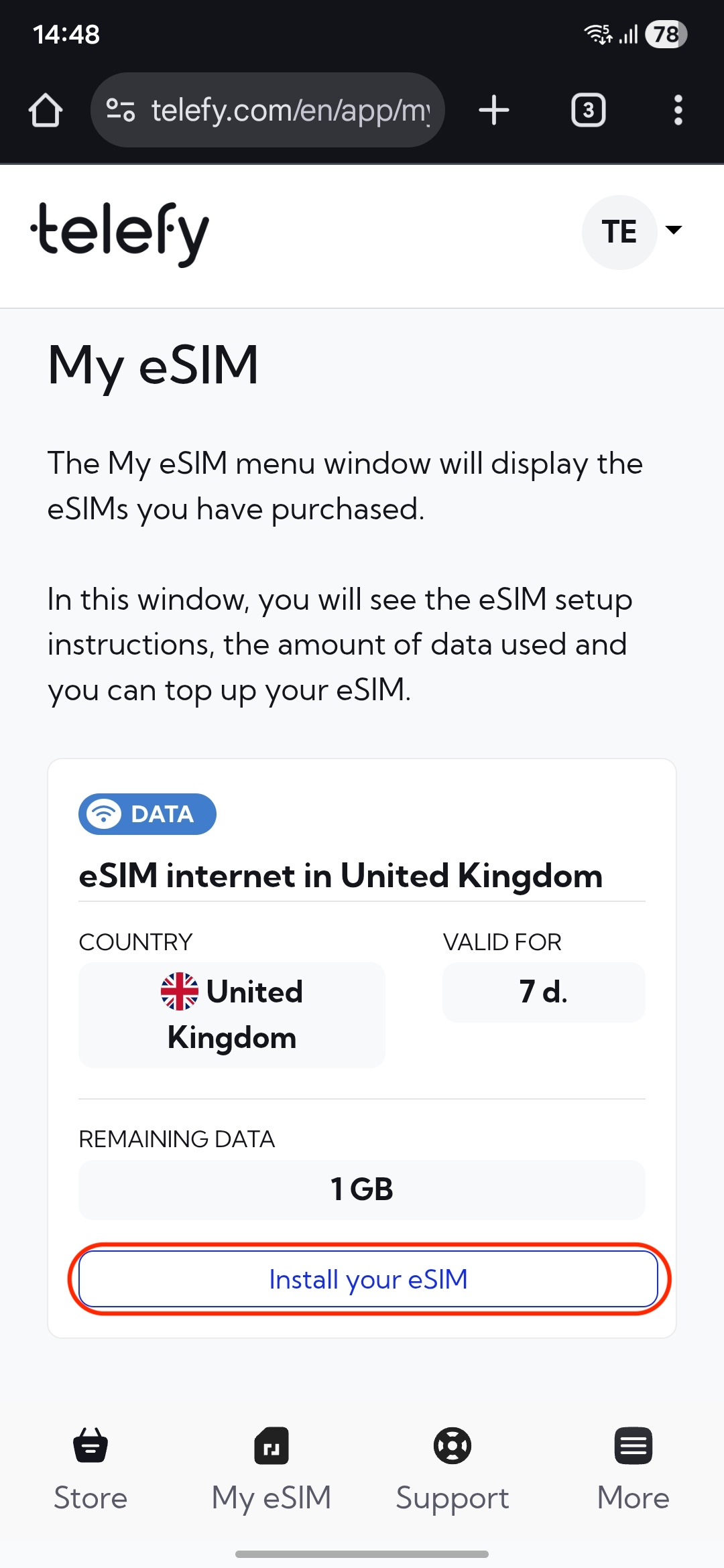
1. Log in to your Telefy account: Log in to your account and tap on "Install your eSIM" in "My eSIM" tab.
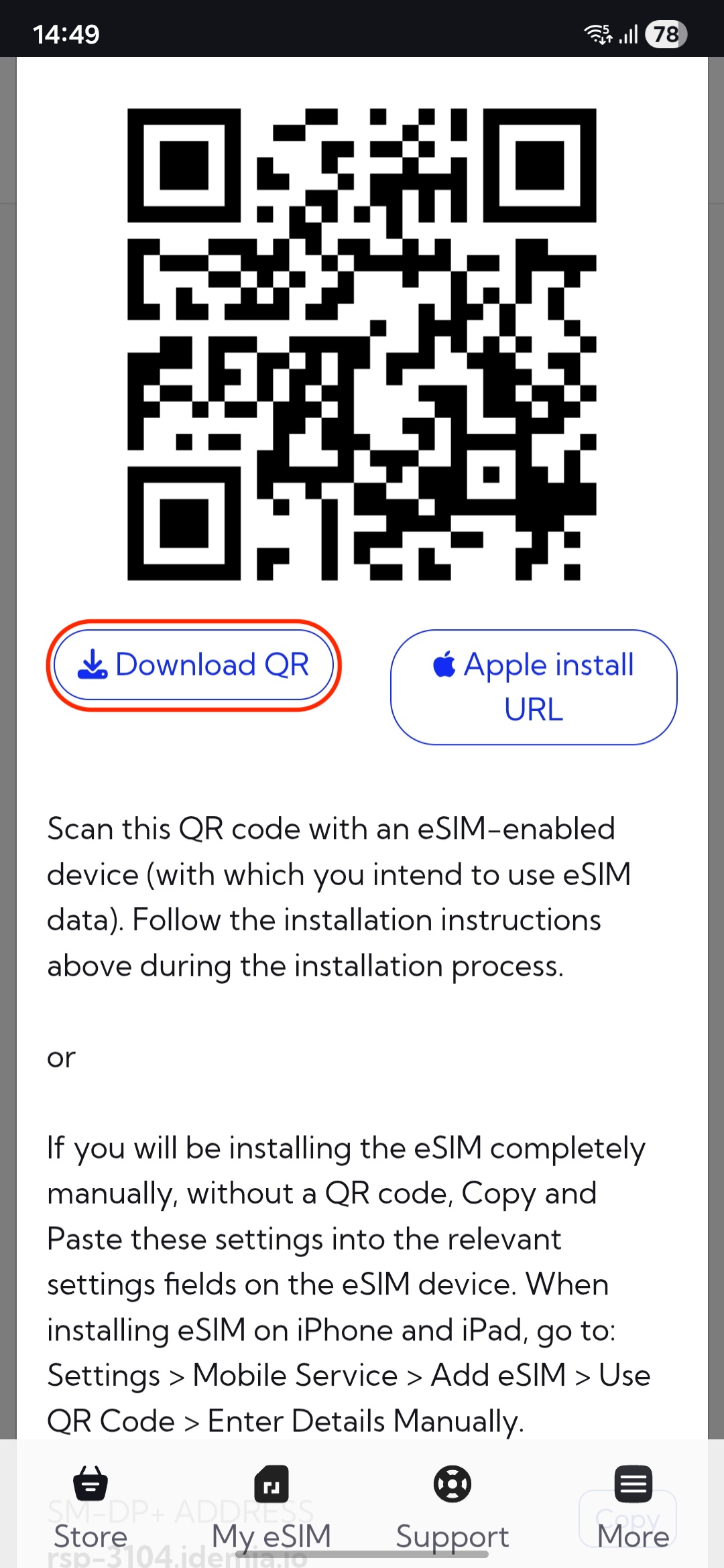
2. Download the QR code to your device: In the pop-up window locate the "Download QR" button and tap it to Download the code.
3. Open Settings: Go to the Settings app.
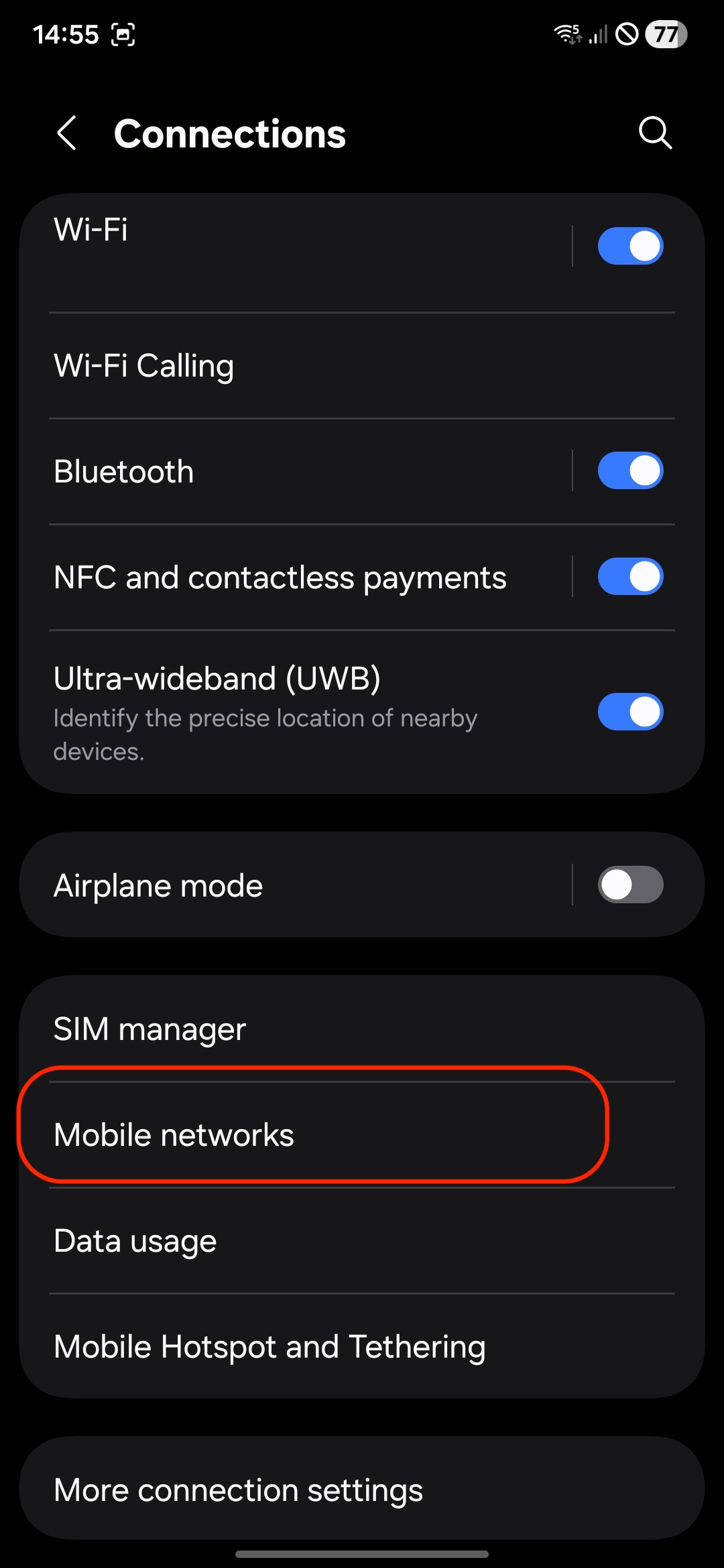
4. Select Connections: Tap on "Connections"
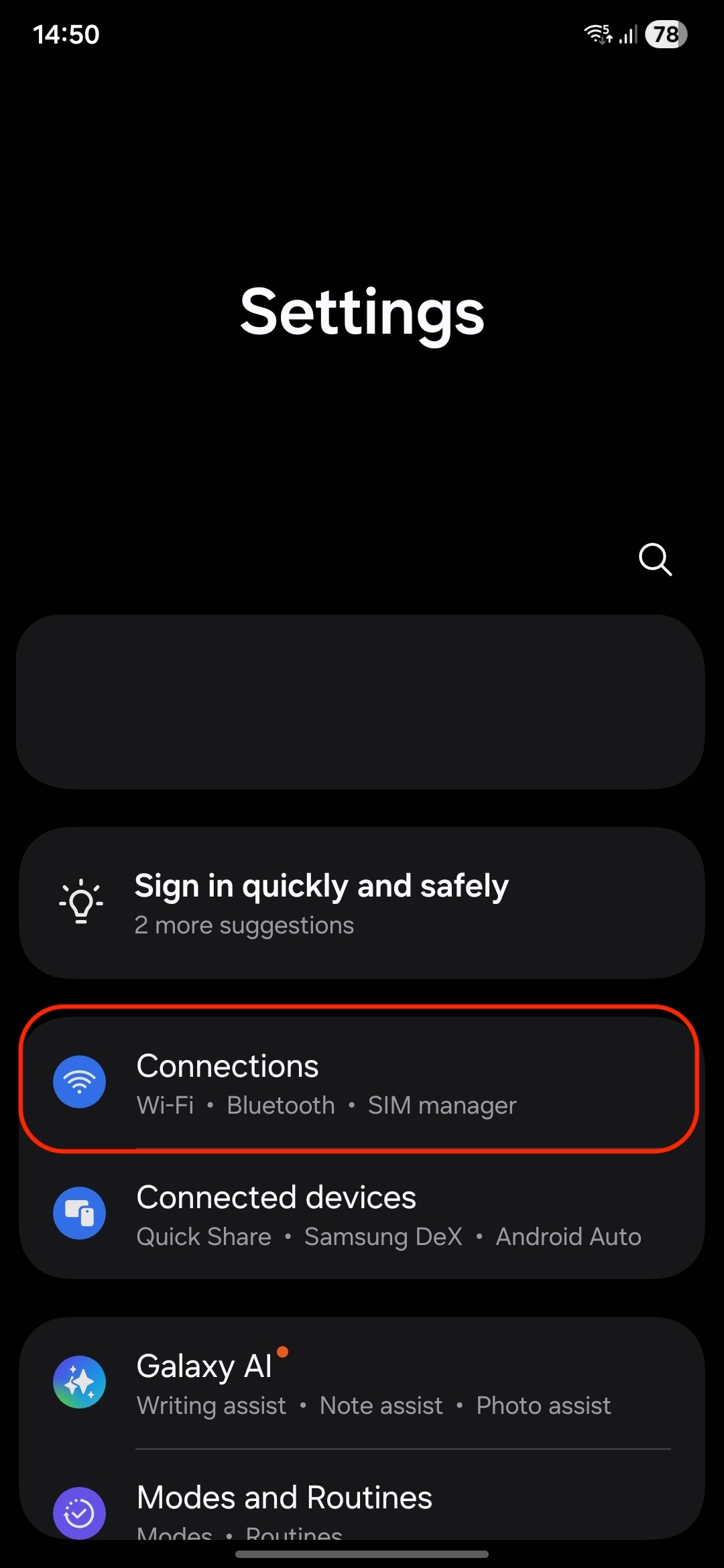
5. SIM Manager: Tap on "SIM manager."
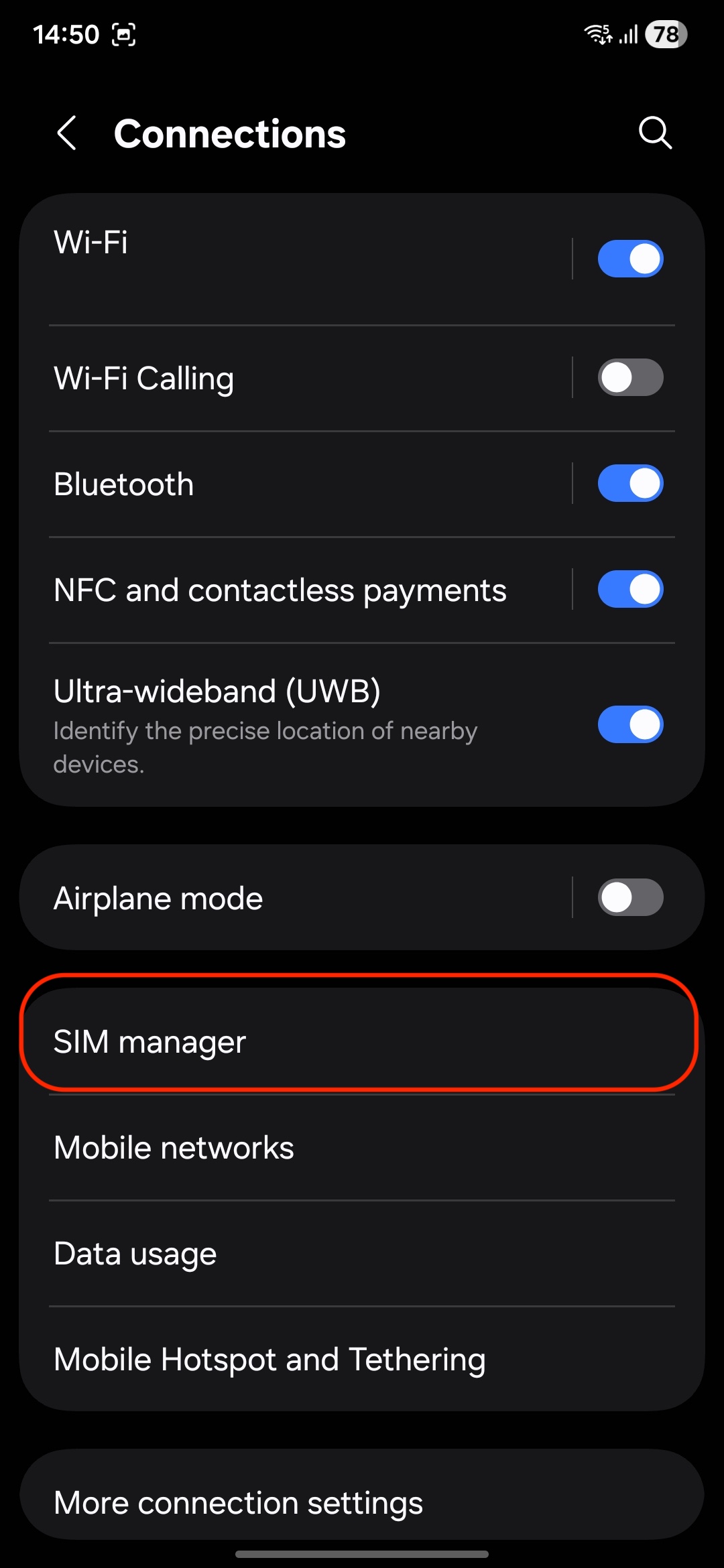
6. Add eSIM: Select "Add eSIM".
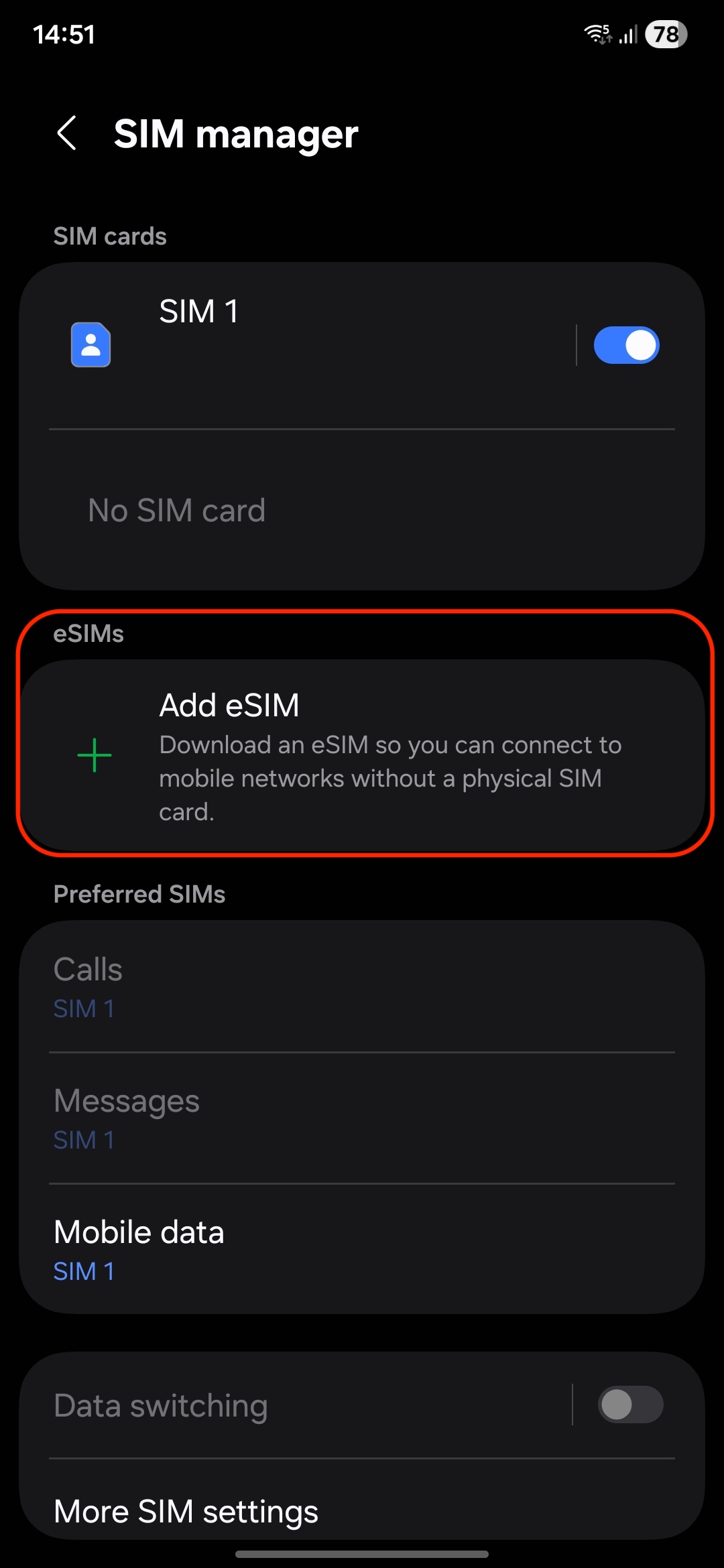
7. Scan QR Code: Use the camera to scan the eSIM QR code provided on the website or select the photo from the gallery.
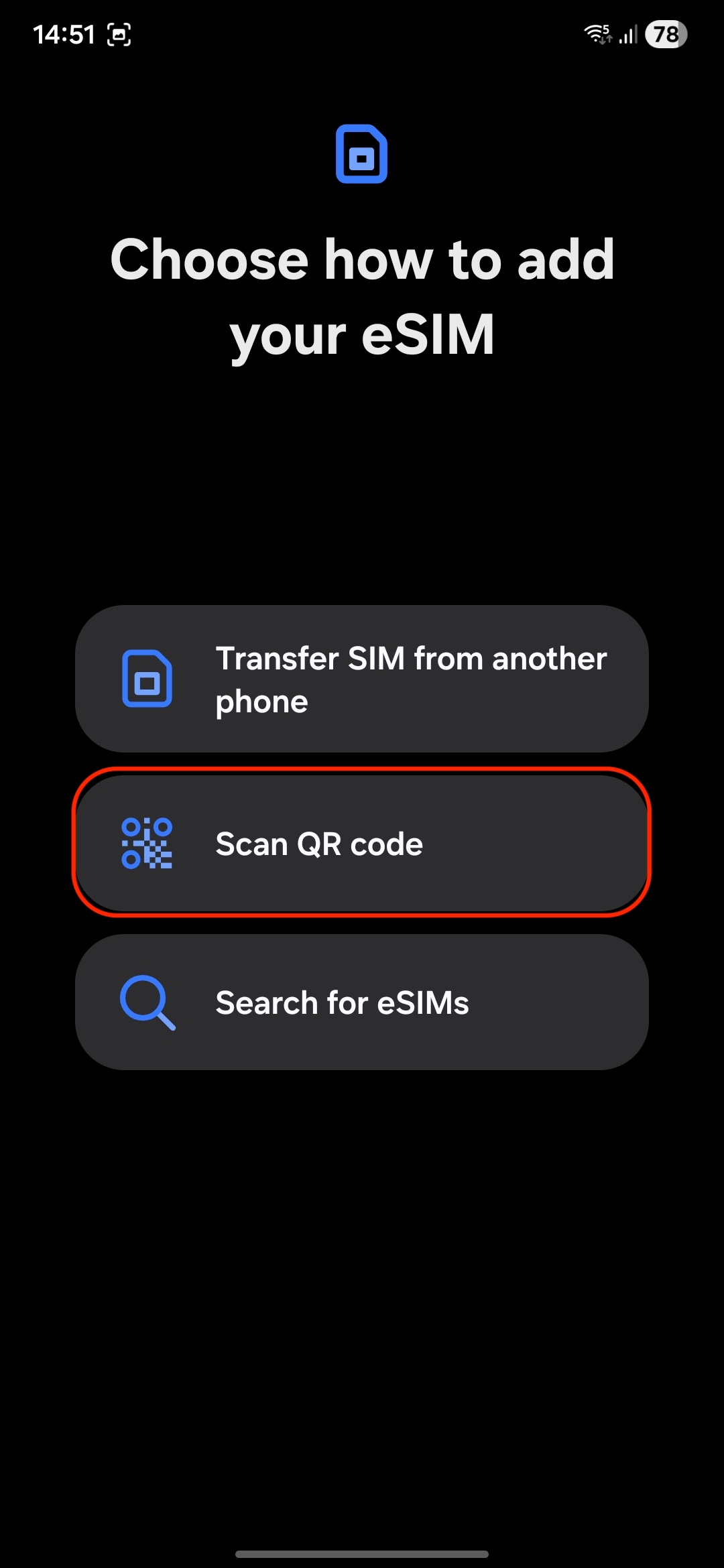
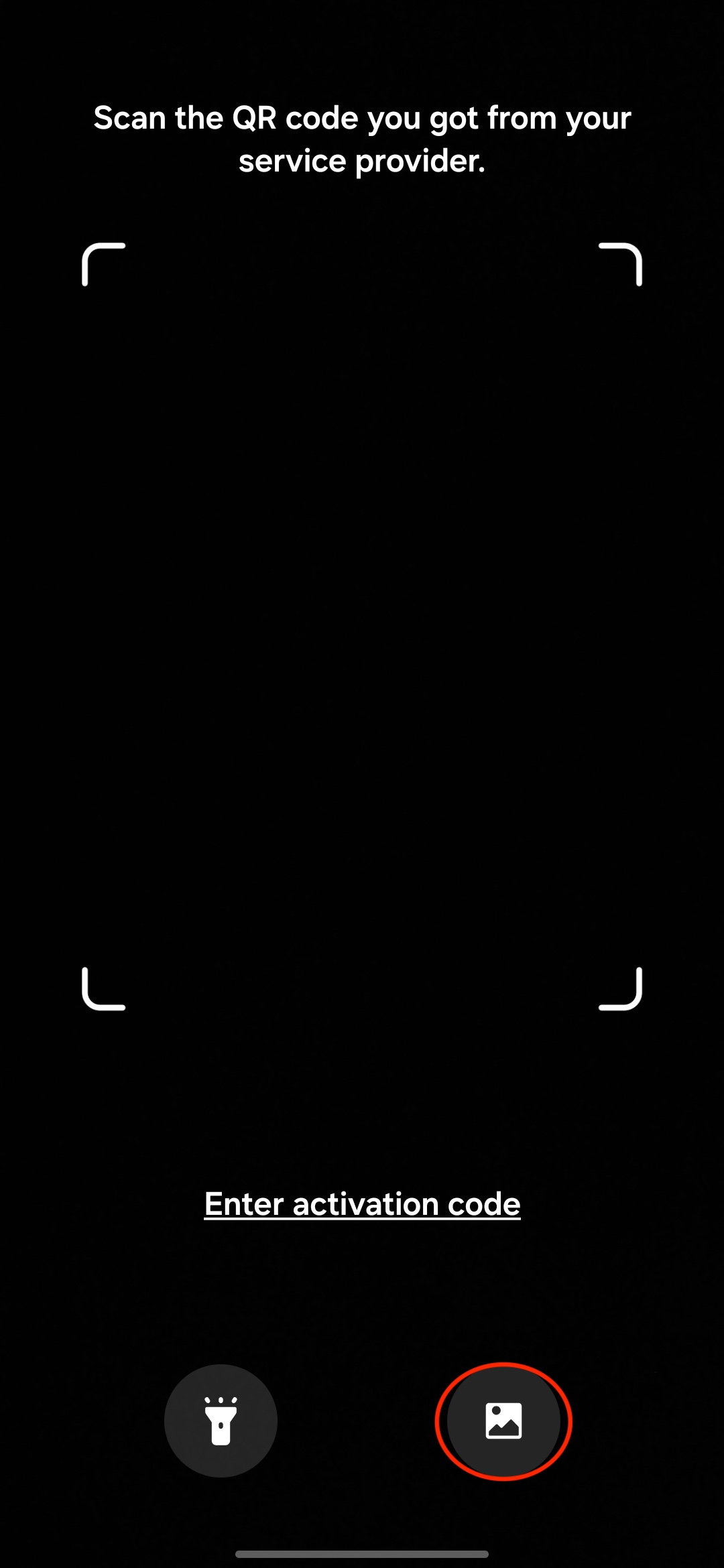
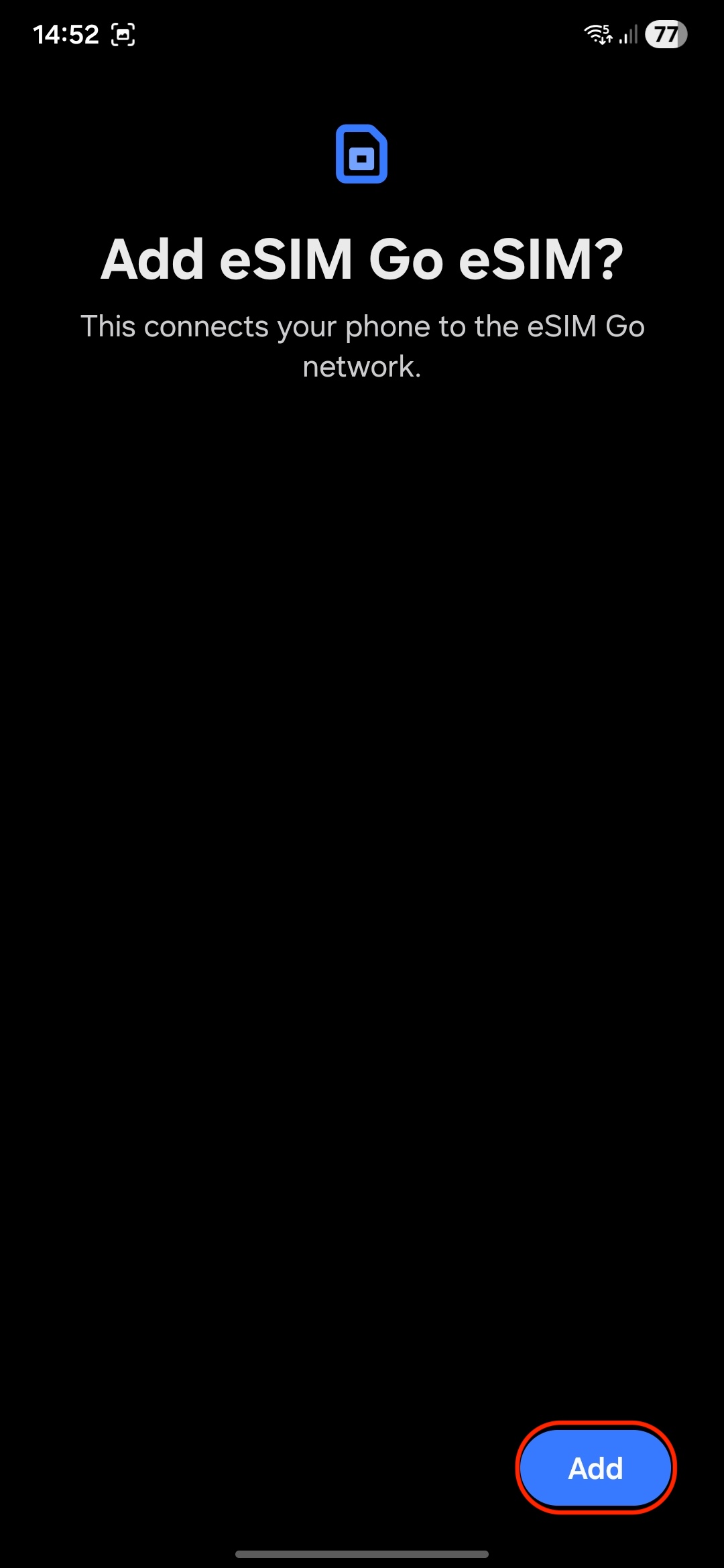
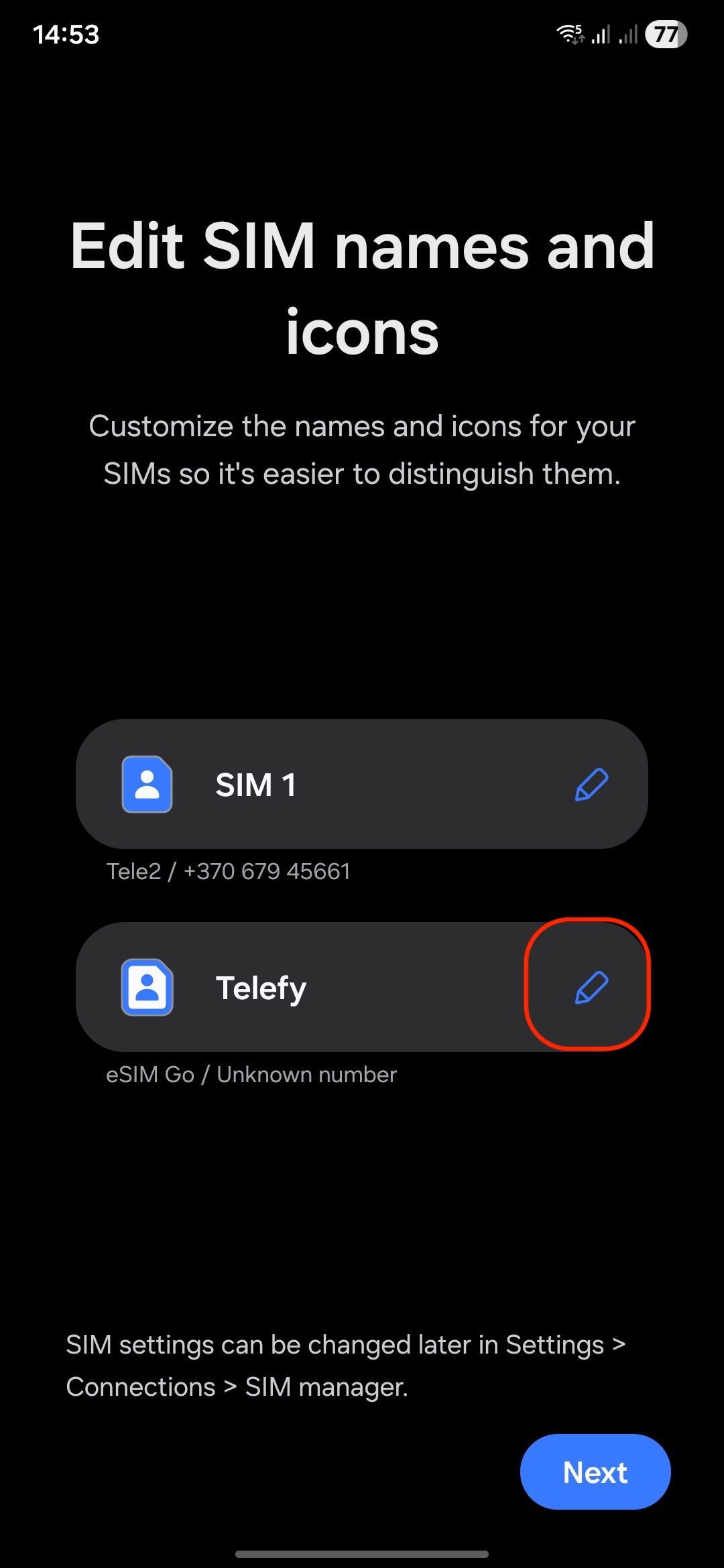
8. Follow Prompts: Complete the setup by following any on-screen instructions. You can rename the eSIM profile by taping on the edit button.
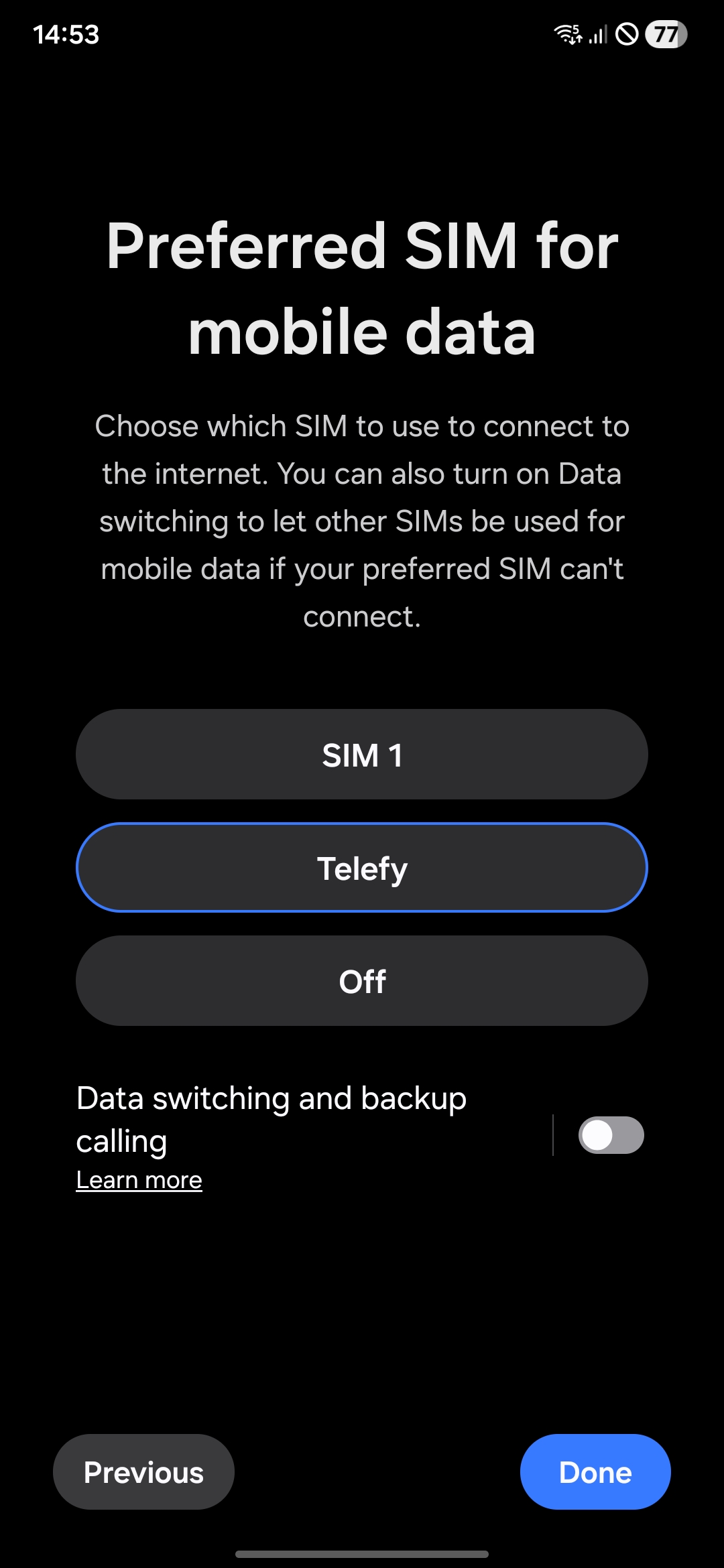
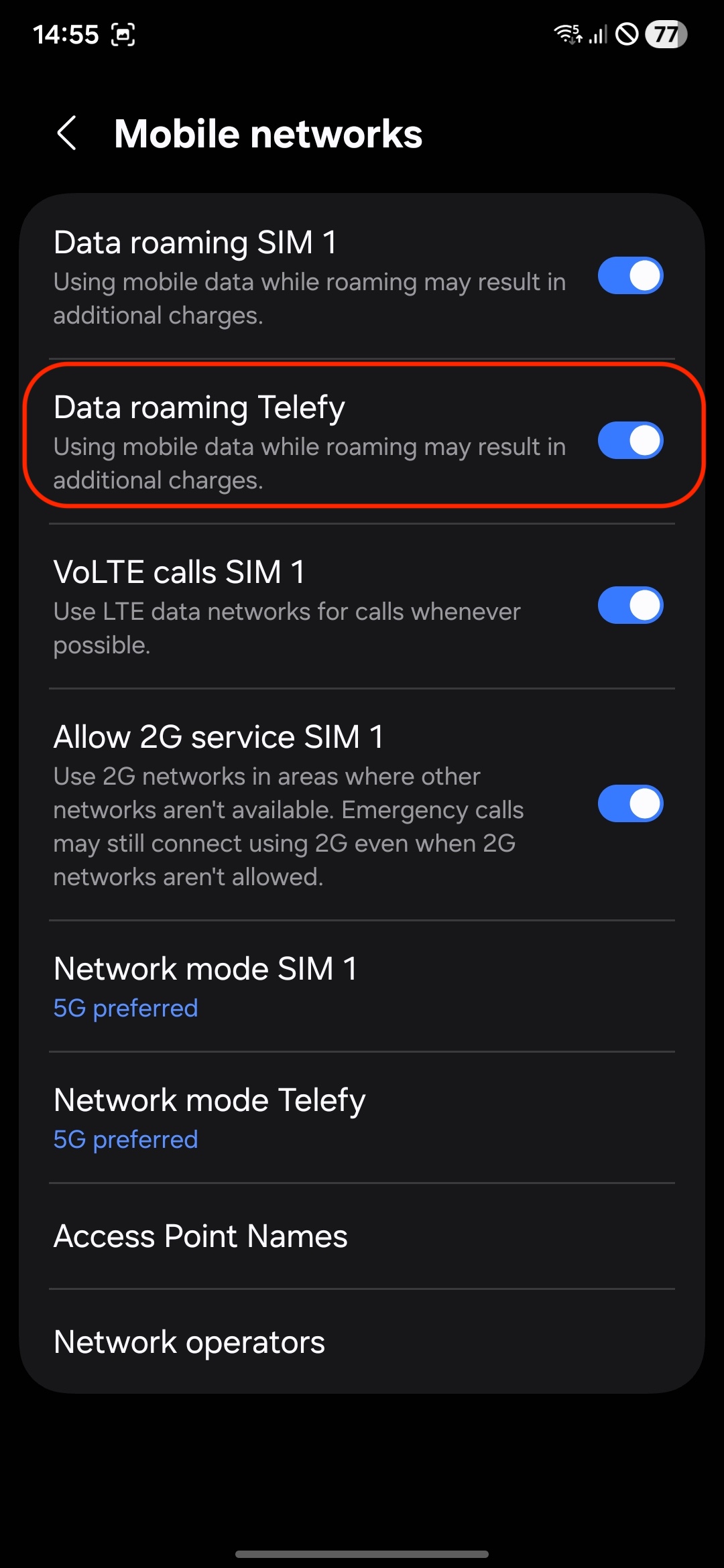
9. Enable Mobile Data: Ensure that mobile data and roaming is turned on for the eSIM.
When installing the eSIM on another Android device:
1. Open Settings: Go to the Settings app.
2. Select Connections: Tap on "Connections"
3. SIM Manager: Tap on "SIM manager."
4. Add eSIM: Select "Add eSIM".
5. Scan QR Code: Use the camera to scan the eSIM QR code provided on the website.
6. Follow Prompts: Complete the setup by following any on-screen instructions.
7. Enable Mobile Data: Ensure that mobile data and roaming is turned on for the eSIM.
If you encounter any difficulties during the installation process, do not hesitate to contact us via email [email protected].
The eSIM does not connect to the internet
Make sure you are located within the eSIM's designated coverage area.
Remember, the eSIM will only connect to the network when you are in the country where the eSIM is registered. If you installed the eSIM prior to traveling, it will only activate once you arrive at your destination. Ensure you are at the location associated with the eSIM for it to function properly.
What steps should I take if my eSIM is installed correctly but won’t connect?
If you are in the coverage area and the eSIM is properly installed, please follow these steps:
1. Disable Airplane Mode: Ensure that Airplane Mode is turned off on your device.
2. Enable Data Roaming: Go to your phone settings and enable data roaming for the eSIM.
3. Restart Your Phone: Restart your device and wait for up to 30 minutes, as it may take some time for the eSIM to connect to the internet.
4. Select Network Manually: Try manually selecting the network that the eSIM should connect to for internet access. This can often help establish a connection.
What if I still can’t connect to the internet after following these steps?
If you’ve completed these steps and still can’t connect, please contact customer support for further assistance at [email protected]
Need help? We've got your back
Our team is just a message away, ready to guide you through every step of your eSIM journey.
Let's talk

FAQ
Should I buy eSIM online France-bound, or wait until I land?
Get it at home. Install in five minutes via the link or QR code in your Telefy account, no app needed, then your eSIM will automatically connect when you reach France. Otherwise use the free airport Wi-Fi at Orly and Charles de Gaulle airports.
Do any of these plans come with a French phone number?
Nope. The O2 and Vodafone eSIMs include a UK mobile number, and our local France plans are data-only (we don't include a number at all).
Can I send texts from the O2 European eSIM?
The O2 card says unlimited calls and inbound texts. There's no mention of outbound SMS, so you should expect to need messaging apps like WhatsApp for anything you send.
What should I do if the eSIM is installed but won't connect?
Double-check Airplane Mode isn't active and that data roaming is turned on for the eSIM line. Then reboot your phone and wait up to 30 minutes. If no joy then choose a network manually, then contact Telefy support.
Which plan should I take to Corsica?
The Vodafone Global listing is the one that mentions France including Corsica, while the O2 listing says France. If you're doing the GR20 then it's best to download your maps and stage details before you go either way.


